Unsubscribe or spam complaint: two levels of do-not-send
Treat an unsubscribe and a spam complaint as different events. An unsubscribe means “stop the marketing”, so receipts and password resets should still arrive. A spam complaint or a permanent bounce means “stop everything”. Email Digit keeps two levels of do-not-send for exactly this reason, and only ever makes an entry stricter, never looser by accident.
Four events that get confused
Most do-not-send problems come from treating these as one thing:
| Event | What it means | What to stop |
|---|---|---|
| Unsubscribe | They no longer want your newsletter or promotions | Marketing only |
| Spam complaint | They pressed “report spam” on your mail | Everything |
| Permanent (hard) bounce | The address does not exist or will never accept mail | Everything |
| Temporary (soft) bounce | A full mailbox, a server that asked you to try later | Nothing, yet |
Get the first row wrong in one direction and a customer who left your newsletter stops receiving their order confirmations and password resets, which is a support ticket waiting to happen. Get it wrong in the other direction and someone who reported you as spam keeps receiving mail, which is one of the quickest ways to damage a sending domain. And treating the last row like the third quietly drops real customers because their inbox was full for a day.
Opt-out rules in most places are written about marketing messages, and receipts and account notices are usually treated differently. The details vary by country, so check the rules that apply to you and your recipients.
The two levels in Email Digit
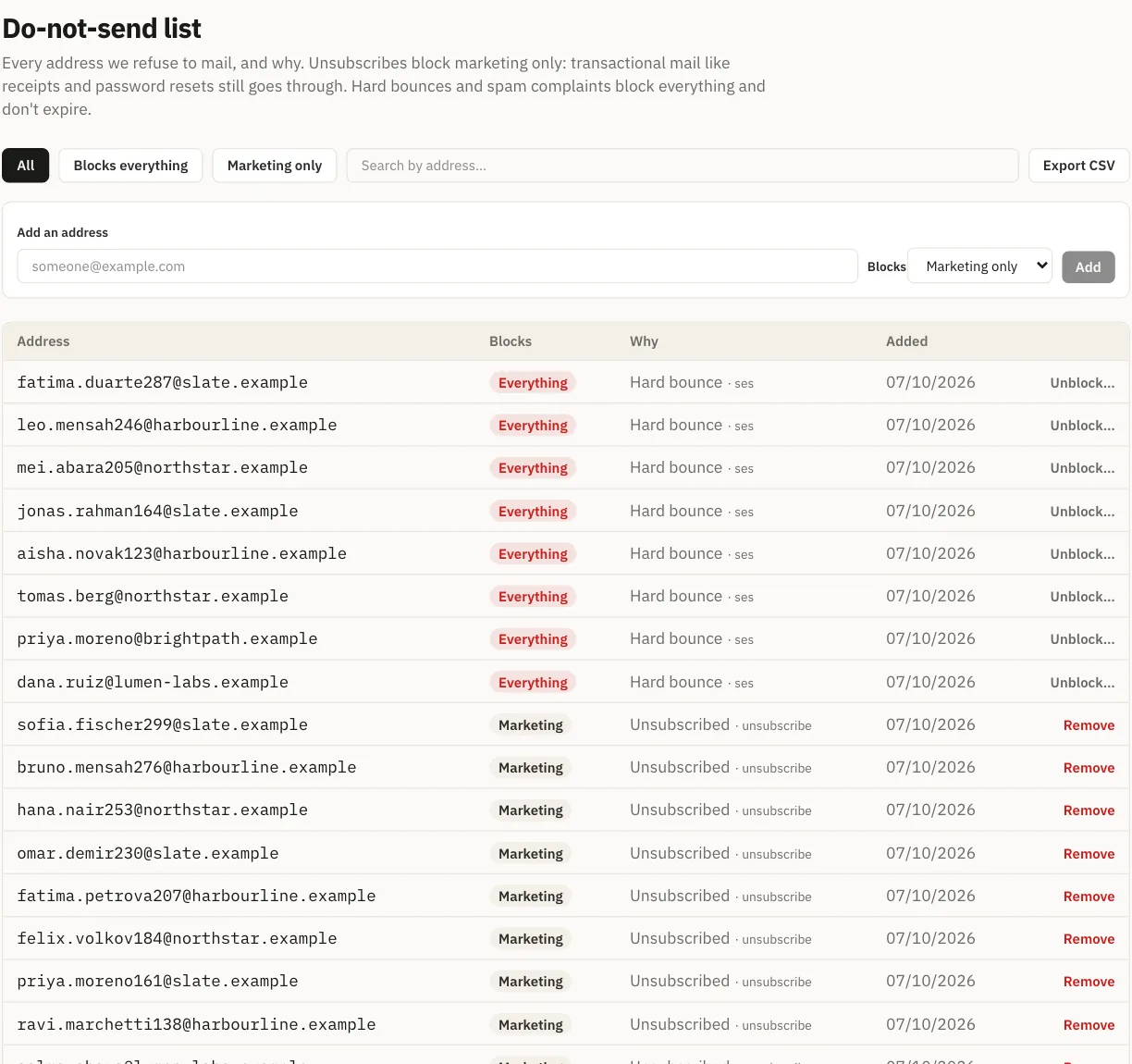
Every entry on the do-not-send list is keyed by email address and has one of two scopes:
- Marketing. Comes from an unsubscribe, an opt-out sent through the public privacy request page, or a contact you chose to stop marketing to. It blocks campaigns and marketing automations. Transactional mail, such as receipts, password resets and other email your app sends, still goes through.
- All. Comes from a permanent bounce, a spam complaint, or a GDPR erasure. It blocks every email to that address, receipts included, and it does not expire.
A temporary bounce never creates an entry. Only bounces the receiving server reports as permanent do. A spam complaint always does, whatever else is true about the contact.
You can also add an address by hand from the do-not-send page and choose which scope it gets, for example when someone asks by phone to stop hearing from you.
Rules that hold the line
An entry can get stricter, never looser by accident
If an address that unsubscribed later hard-bounces, its entry is raised from marketing to all. The reverse never happens automatically: a later unsubscribe on an address that already has an “all” entry leaves it at all, with its original reason intact. So the list never forgets that someone complained because they also clicked unsubscribe afterwards.
Lifting a bounce or complaint block takes a deliberate step
Removing a marketing entry works like any other edit. Removing an “all” entry is refused, with the reason shown (“reported as spam” or “bounced permanently”), unless the request explicitly accepts the risk. In the dashboard that is a separate confirmation that says sending again may harm your reputation and, after a spam complaint, may be unlawful, and asks you to proceed only if the person has told you directly that they want your mail.
A button that appears to work and silently does nothing would be worse. This one explains itself.
The check happens at send time too
Campaign audiences are filtered against the list when the recipients are counted, and each individual send is checked again as it goes out, so an address added a minute before a send still counts.
An example
Amira unsubscribes from your newsletter in March. Her entry is marketing level: your campaigns skip her, and her April order confirmation arrives as normal. In May she reports one of your emails as spam. Her entry is raised to all, with the complaint as the reason. From then on she receives nothing from your account, receipts included, until someone deliberately lifts the block.
Proving it later
The whole list downloads as one CSV with five columns: email, scope, reason, source and the date the entry was created. It is not paginated, because an audit export that quietly stops at page one is not an audit export. It covers up to 100,000 entries.
email,scope,reason,source,created_at
amira@example.com,marketing,unsubscribe,...,2026-09-14T10:02:11+00:00
ops@example.net,all,hard_bounce,...,2026-09-15T08:41:57+00:00
If you keep a copy of opt-outs in your own systems, developers can subscribe to a webhook that fires once for each new entry, rather than polling the list.
Limits worth knowing
- Entries are per email address. A person with two addresses has two entries, and an opt-out on one does not cover the other.
- There is no bulk upload of a do-not-send list. If you are moving from another tool, remove its unsubscribed and bounced addresses from your file before importing, or add them one at a time.
- The list stops mail. It does not delete the contact or their history. Removing a person’s data is a separate action, erase, which also adds them to the list at the “all” level first.
Someone who left your newsletter still wants their receipt. Someone who reported you as spam wants nothing from you. Read more about how Email Digit protects deliverability.