Run every campaign with one sentence.
You still make the call.
Tell your AI what you want, or describe it inside Email Digit. It drafts the campaign or the whole automation, picks the audience and waits for your yes. Contacts are never counted or charged for, and your report leads with replies and revenue, because open rate stopped being a measurement.
The number on your dashboard
is probably wrong.
Apple Mail opens messages on its users' behalf, so a large share of reported opens are software. Why opens stopped being a measurement.
Every tool you've used still puts that number in 48pt type at the top of the report, because it's the number that goes up.
We show opens de-emphasised and labelled unreliable, and we never let them count: not in a contact's score, not in a segment, not as an automation branch. What we score is what took a decision: a click, a reply, a conversion. Weighted by recency, so a contact who's been quiet for six months stops looking like an asset. Open any score and you see which events produced it.
Your numbers will look smaller here. They were always this size.
Deliverability isn't a checklist
item you'll get to.
You publish four DNS records once (see the four). After that, the parts that need watching are watched.
Every marketing send carries one-click unsubscribe in the header, the way Gmail and Yahoo require. Opt-outs and hard bounces go to a do-not-send list that only ever gets stricter: an address that hard-bounced can't be sent to again by a later import or a stray automation.
None of that is a plan feature. It's on every plan, from your first free day.
Know exactly who
you're sending to.
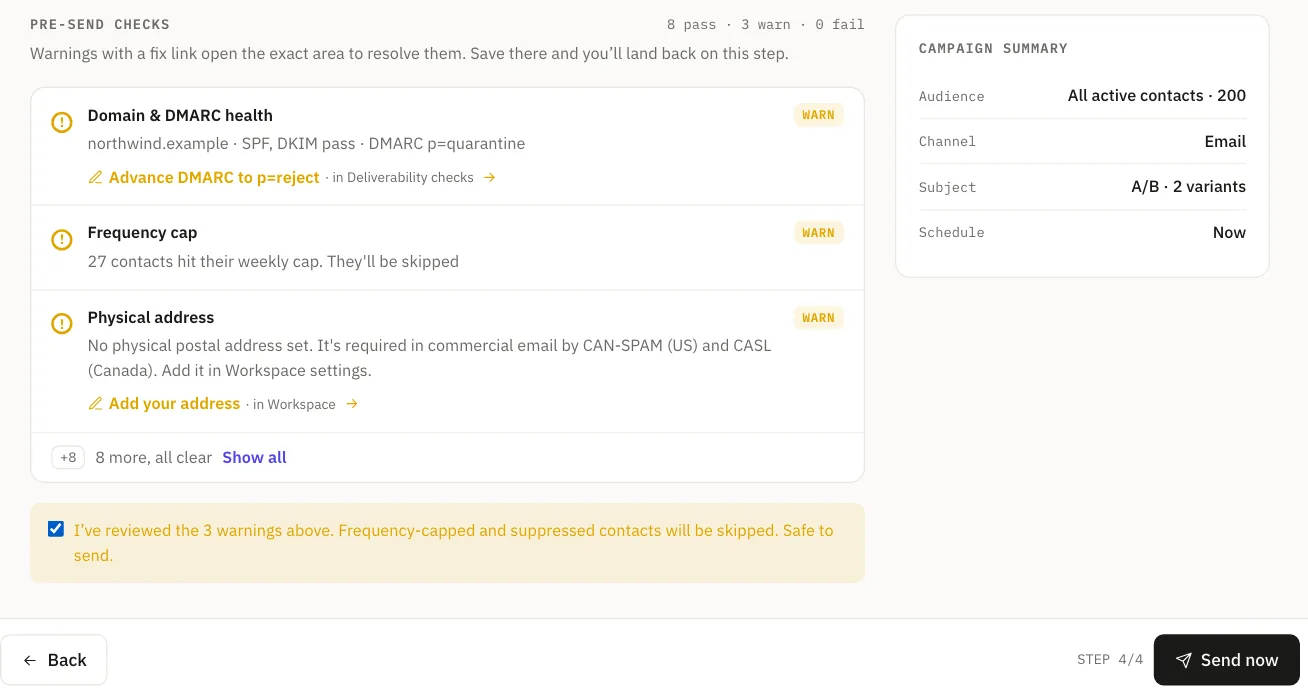
Four steps: audience, content, schedule, review.
Audience
The recipient estimate breaks into line items that sum exactly to the number that gets sent. Suppressed, excluded by segment and frequency-capped are shown separately and never overlap, so the arithmetic reconciles. Most tools show a fuzzy count that doesn't.
Content
Subject, body and an optional A/B subject. Write it in the editor, describe it in a sentence, or paste an email you already have.
Schedule
Send now, schedule for later, or send at 9am in each recipient's own timezone.
Review
Pre-send checks run, each with a link straight to the fix. Sending from an unverified domain is blocked, not warned about. The send allowance check confirms your workspace has enough sending allowance left to cover this audience before anything goes out.
The editor writes in your voice.
Point us at your website once. We read your palette, your fonts and how you write, and apply all three to everything we generate afterwards. If your site blocks automated access we tell you and give you editable defaults, instead of inventing a brand and labelling it yours.
- Fourteen block types, per-block spacing and backgrounds, a hide-on-mobile switch, and preset column layouts.
- Merge fields that autocomplete as you type:
{{first_name}},{{company}}, and any field you define yourself. - Inline AI on any block, in your brand's tone. Or describe the email in a sentence and edit what comes back.
- Paste an existing HTML email and it imports intact. Save a block you'll reuse.
- Email-safe output that survives Outlook and dark mode, and right-to-left languages lay out properly.
Describe the outcome.
Edit the flow.
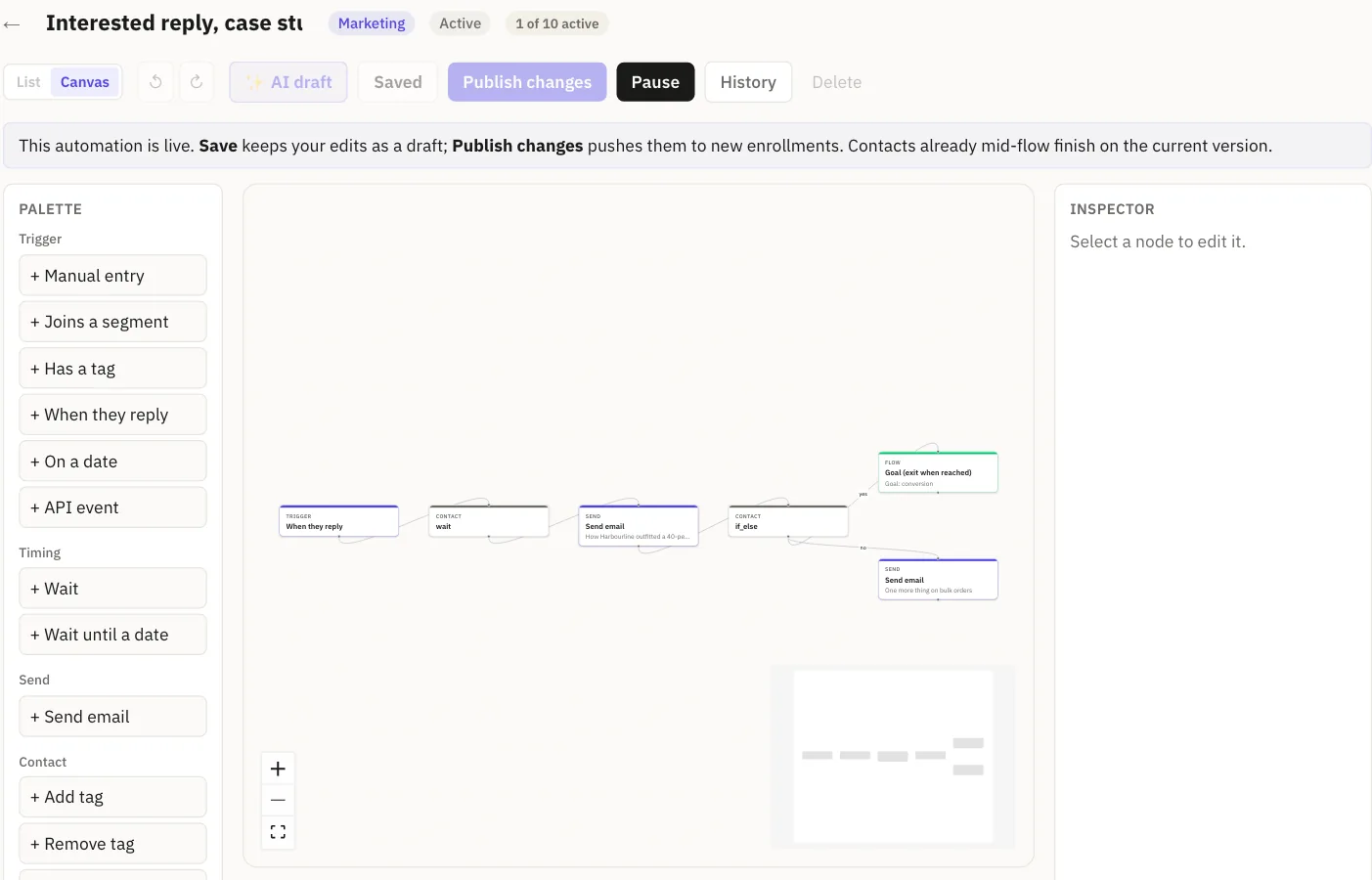
Drag a trigger, drop an action, and the next node connects itself. Trigger on a segment entering, a tag landing, a date arriving, or a reply arriving with a specific meaning: “an unhappy customer replied about billing” is a trigger, not something you read on Monday.
Describe the outcome in a sentence and we'll lay out a first draft of the whole flow for you to edit. Real branching, not just a straight line. Set the goal on a conversion, a reply or an engagement tier moving up. You can't set one on opens, for the reason above.
Frequency caps, quiet hours and the do-not-send list run underneath every flow, and the run log shows exactly which node each contact hit and why they took that branch.
Every reply, sorted before
you open the inbox.
Replies arrive read. Each one is tagged with who's writing, what it's about, what they want, how they feel, how urgent it is, and how strongly, plus a risk flag when there's something like a legal threat or a chargeback in it. Those become one priority number you can sort by, with the reasoning shown.
“Looks good. What does this cost for a team our size? We're moving off our current tool this quarter.”
“Hi! I loved your site and I'd love to show you how our SEO service can triple your traffic.”
“That's the third charge I didn't authorise. I'm sending this to my lawyer.”
Then it drafts the reply. You pick the situation from a dropdown, not a prompt box, and get an editable draft in your brand's voice. Get one wrong, correct it once, and that correction becomes a rule for that sender or domain going forward, inside your workspace only. How replies are read.
A customer record,
not a mailing list.
One record per person. Consent and reachability tracked separately, because permission and deliverability are different questions.
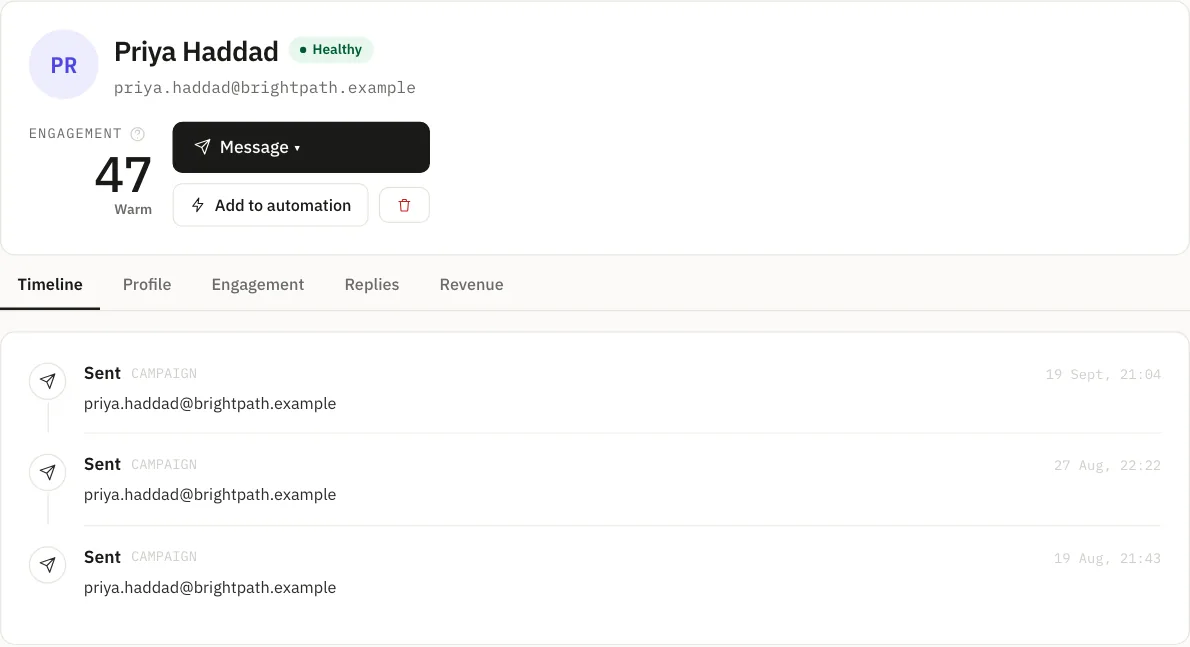
A health status per contact. Custom fields you define. Segments computed from real behaviour. An append-only consent trail, timestamped. And one timeline per person showing every send, click, reply and conversion.
Reports that lead
with replies.
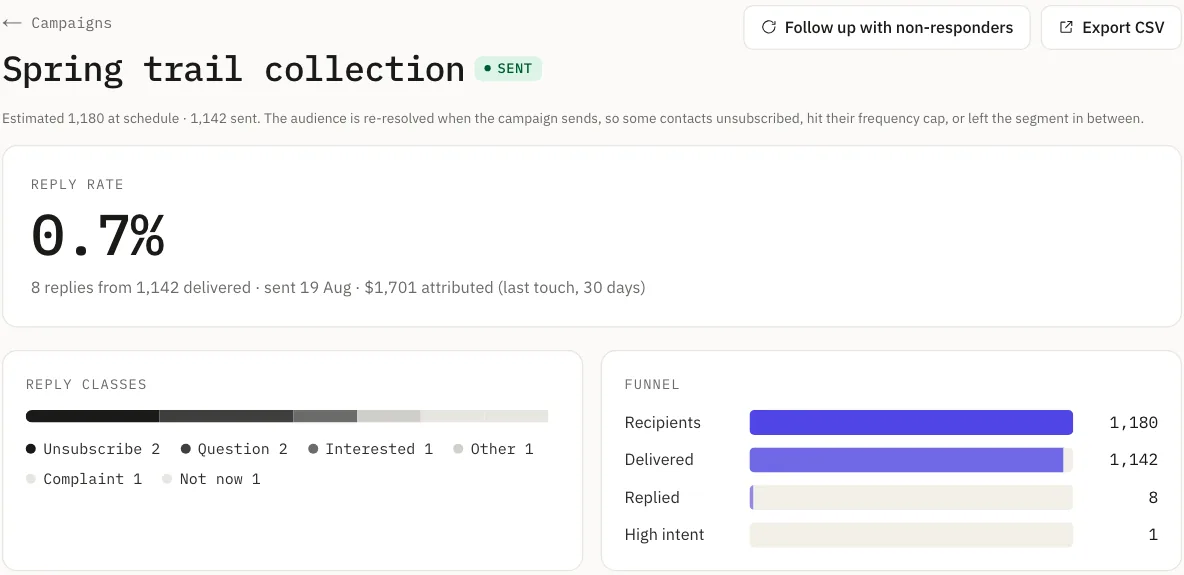
Campaign reports lead on reply rate, with revenue attributed on a 30-day last-touch window and replies broken down by what they meant. A/B subject testing reports per-variant reply rate, not per-variant opens.
Scheduled reports arrive by email on your cadence: revenue, engagement or campaign performance. Revenue reporting never merges currencies into one meaningless total. Campaign results and your contact list both export to CSV.
Moving in.
Coming from Mailchimp, Klaviyo, ActiveCampaign or HubSpot.
We'll do it with you. Mailchimp, Klaviyo, ActiveCampaign and HubSpot, on a call. Nothing lands until you approve it.
What doesn't survive, told to you up front: predictive scores we don't compute, platform-specific templates, and lead-scoring rules you'll want to redefine rather than translate.
On your own, any time: CSV import with column mapping onto your own custom fields. Addresses already on your do-not-send list import as unsubscribed instead of coming back sendable, so nobody you've already lost gets re-mailed.
Not built: Zapier, n8n, Make and Salesforce connectors. Our REST API and signed webhooks are the route today.
Marketing-shaped questions.
Will my open rate drop if I switch?
Your reported number might change, because we're not counting the same things. What people actually do won't change because you switched tools.
Do I lose engagement history?
Bring what your current platform exports. We'll tell you plainly what can't come across rather than silently dropping it.
Can I keep my current provider for transactional?
Yes. Plenty of sensible shapes exist: campaigns here and app email elsewhere, or the reverse, while you evaluate.
Why price by emails sent instead of contacts?
So your list can grow without your bill growing with it. You pay for the emails you send, and contacts you are not emailing cost nothing to keep. How to compare the two models.
Is there a contract?
No term on the self-serve plans: pay monthly by card, and change or cancel your plan any time from Billing. Enterprise has a standard 12-month term.
Replies and revenue,
not open rates.
Broadcasts, automations and segments on a sending stack that manages its own authentication. Contacts are never counted or charged for.