One POST to send.
Authentication handled.
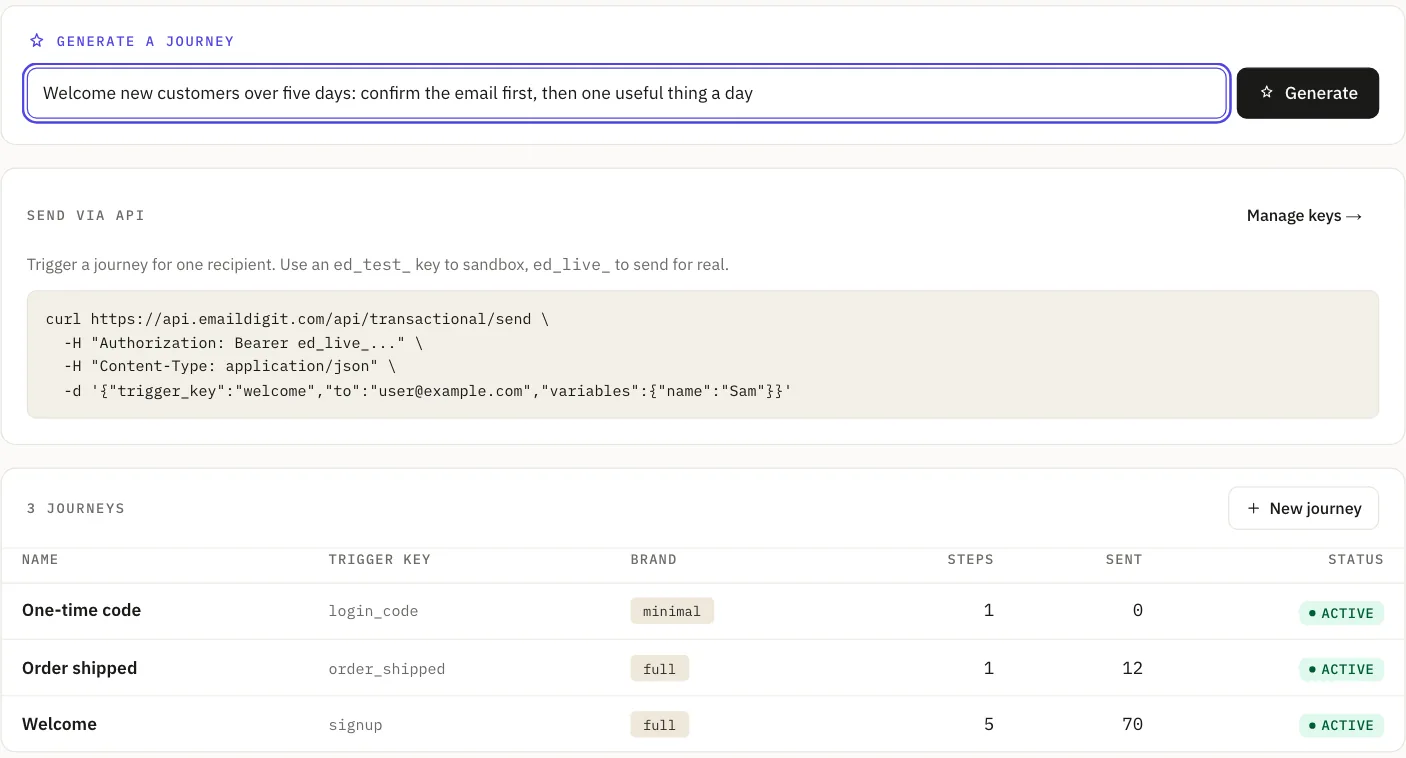
Define the email once. Write it, or generate a journey from a sentence. Then your app fires a trigger and we deliver it, signed, from your domain. Test keys sandbox everything. Managed SPF, DKIM and DMARC on every plan, from your first free day.
Guides for developers: An API key leaked: spot it, contain it, replace itRetry a transactional email without sending it twiceVerify, retry and replay email webhooks safelyAll guides
Two steps,
once.
Create the trigger
Give it a key like password_reset, write the email (or generate a journey from a sentence and edit what comes back) and declare the variables it takes. Do this in the dashboard or over the API.
Fire it from your app
One authenticated POST. 202 Accepted. That's the whole integration.
# Fire the trigger: one authenticated POST
curl -X POST https://api.emaildigit.com/api/transactional/send \
  -H "Authorization: Bearer $ED_API_KEY" \
  -H "Content-Type: application/json" \
  -d '{
    "trigger_key": "password_reset",
    "to": "ada@example.com",
    "variables": {
      "first_name": "Ada",
      "reset_url": "https://app.example.com/r/abc123"
    },
    "idempotency_key": "pwreset_8f21c"
  }'

# → 202 Accepted
{
  "trigger_key": "password_reset",
  "status": "enrolled",
  "mode": "live",
  "enrolled_steps": 1,
  "message_ids": ["9f2c1a4e-..."]
}
Why a trigger key instead of raw subject and HTML: the copy lives in one place instead of being compiled into your application. A non-engineer can fix a typo in your receipt email without a deploy, and a one-email reset can become a three-email onboarding sequence without you touching the call site. If you want the email to live in your code, send raw HTML through the same endpoint on a trigger with a single pass-through step.
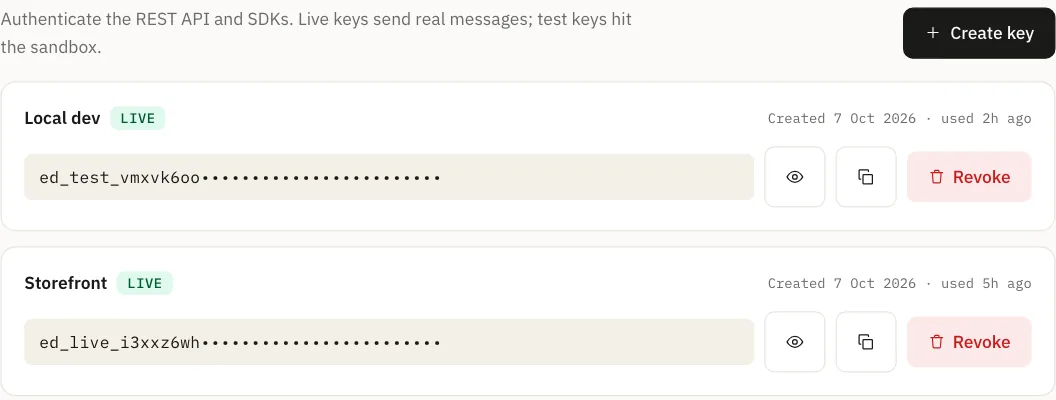
Test keys sandbox everything.
Same endpoint, same payload: the key decides, so your staging environment cannot email a customer no matter what's in its database.
ed_test_…Records the send, renders the final HTML, delivers nothing. The result is labelled simulated, never delivered, because nothing was delivered.
ed_live_…Sends for real, from your verified domain. The key prefix tells you which one you're holding.
A test send runs the same pre-send evaluation the live path runs, so you see whether suppression would have stopped it. Test keys also work against draft triggers, so you can wire up an integration before the email is finished.
The boring infrastructure
you would have built anyway.
Idempotency, signing, retries, a searchable log. None of it email-specific cruft you have to wire up by hand.
Generate a journey from a sentence
Live“Onboard a trial signup to first value, then to paid.” That sentence produces a complete multi-step journey with every subject and body written, on your brand, ready to edit. Steps fire on events you emit, not on a schedule you have to maintain.
Idempotency is a field, not a policy
LivePass idempotency_key and a replay returns the original result instead of sending again. Retry your queue as aggressively as you like.
Logs you can actually search
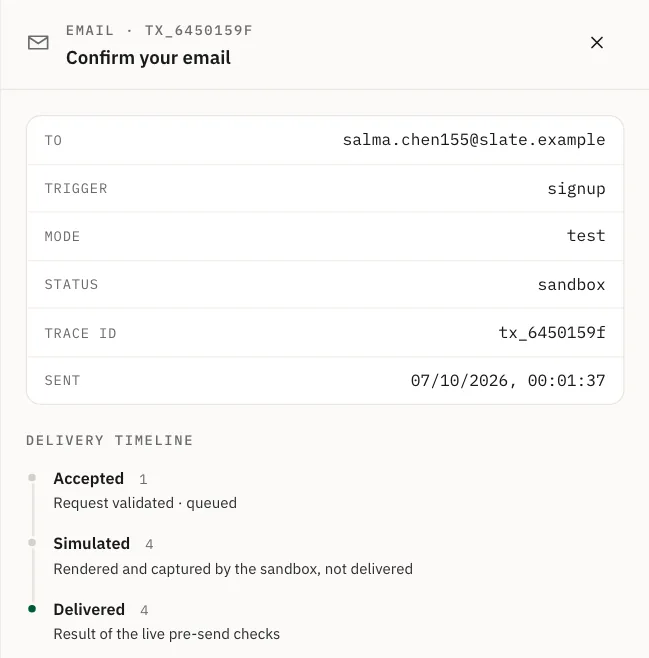
LiveEvery send is a row: recipient, trigger, mode, status, subject, the variables you passed and the final rendered HTML. Filter by status, open one, read the delivery timeline, copy the payload as JSON, or resend a message that failed.
Webhooks, signed and retried
LiveEvery delivery is HMAC-signed and retried on failure, with a delivery history you can inspect and replay.
Scoped tokens
LiveTokens are per workspace and can be scoped: scope a key to email:send and it can send and nothing else. Keys self-identify with an ed_live_ or ed_test_ prefix, so secret scanners catch an accidental commit.
The inbound half
LiveReplies to your app's email don't vanish into a no-reply mailbox. They arrive classified (what the person wants, how urgent, whether it carries risk) with a draft response you can approve. Anything flagged for review is draft-only and will not send on its own.
Verify the signature,
then dispatch.
Every event is HMAC-SHA256-signed over the timestamp and the raw body. Verify it, drop anything unsigned, dispatch on event type. Two of the most-deployed examples below: the same pattern in every other language.
// Verify the X-Email-Digit-Signature header on inbound deliveries
import crypto from "crypto";
import express from "express";

const SECRET = process.env.ED_WEBHOOK_SECRET;

function verify(rawBody, header) {
  const [sigPart, tsPart] = header.split(",");
  const sig = sigPart.slice("sha256=".length);
  const ts = tsPart.slice("t=".length);
  // Reject anything older than 5 minutes (replay defense)
  if (Math.abs(Date.now() / 1000 - Number(ts)) > 300) return false;
  const expected = crypto
    .createHmac("sha256", SECRET)
    .update(ts + ".")
    .update(rawBody)
    .digest("hex");
  return crypto.timingSafeEqual(Buffer.from(sig), Buffer.from(expected));
}

// IMPORTANT: use express.raw. JSON parsers re-serialize and break the MAC
app.post("/webhooks/email-digit",
  express.raw({ type: "application/json" }),
  (req, res) => {
    if (!verify(req.body, req.get("X-Email-Digit-Signature"))) {
      return res.status(401).send("invalid signature");
    }
    const event = JSON.parse(req.body.toString("utf8"));
    // dispatch on event.type
    res.status(200).send("ok");
});Subscribe to what happened.
Subscribe to all of them with *, or just the ones you need. Same payload envelope across every type.
email.sentAn outbound email is accepted for delivery.email.bouncedAn outbound email fails at the sending layer.reply.receivedA reply lands in the workspace, after classification.suppression.createdAn address is added to the do-not-send list.domain.verifiedA sending domain becomes verified.automation.firedAn automation action ran for a contact.Authentication you don't have
to become an expert in.
You publish four DNS records once, and we keep them current from then on. See the four records and what each one does.
Rotate keys in one click; two selectors and a grace window mean nothing in flight breaks. Step DMARC up in one click once your alignment data says it is safe. A new domain warms up on a graduated daily ceiling that only advances on healthy days.
Since May 2025, Outlook, Hotmail and Live require SPF, DKIM and DMARC from any domain sending more than 5,000 messages a day, and mail that fails is now refused rather than filed in junk. If you've seen 550 5.7.515 Access denied or 550 5.7.26 in your logs, that's this.
No per-domain fee for DMARC monitoring. No separate deliverability tier. It's on every plan.
What isn't here.
The things you'd otherwise find out after you started building.
No client libraries.
REST and a bearer token.
curl,fetch,requests, whatever you already have.Sending needs a verified domain.
You can build and test before that; live delivery waits for the four records.
Rate limits are generous and unpublished.
They exist to stop a runaway, not to shape normal use. We'll publish exact numbers alongside the response headers when those ship. The two arrive together, because a documented limit with no header to read is worse than no limit at all.
Monthly plans only.
The first 15 days are free, with no card. After that you choose a plan, charged straight away and then monthly. There is no pay-as-you-go or per-email overage billing yet: past your plan's monthly emails, transactional mail keeps sending and we ask you to move up a plan.
We don't compute a delivery score.
Some tools show one. Ours would be a made-up number, so there isn't one.
Things developers actually ask.
What can trigger a send?
An API event you post, or a contact action inside the platform: segment entry, a tag, a reply, a date field.
Are there SDKs?
No. A REST API and webhooks. Client libraries aren't built, and we'd rather say that than publish an install line for a package that doesn't exist.
How do I stop a send to someone who complained?
You don't have to. Suppression is checked on every send, and complaint-driven suppression blocks every stream, including your app's email.
Can I use my own domain?
Yes. You publish four DNS records once (see the four) and we handle signing from then on.
Read the docs.
Then get a test key.
Test keys deliver nothing and sandbox everything, so you can build the whole integration before a single email leaves the building.