Contact health: Healthy, At risk and Unreachable
Every contact in Email Digit carries one of three health labels, checked in a fixed order. Unreachable comes first: you have no consented way to email this person. At risk comes next: you can reach them, but their engagement score is under 40. Everyone else is Healthy. Each label is a rule you can check, not an opinion.
Why one label beats two numbers
A contact record usually answers two separate questions, and lists tend to blur them:
- Can I email this person at all? That is about the address and permission: does it exist, has it bounced, did they complain or unsubscribe.
- Are they still listening? That is about behaviour: have they clicked, replied or bought recently.
The first question always wins. A contact with a great history and a bounced address is not a relationship you can work on by email; it is a record to fix. A health label that checks reachability before engagement stops you treating them as one.
The three labels
| Checked | Label | Means |
|---|---|---|
| First | Unreachable | No consented way to email them |
| Second | At risk | Reachable, but engagement score under 40 |
| Last | Healthy | Reachable, and engagement score 40 or more |
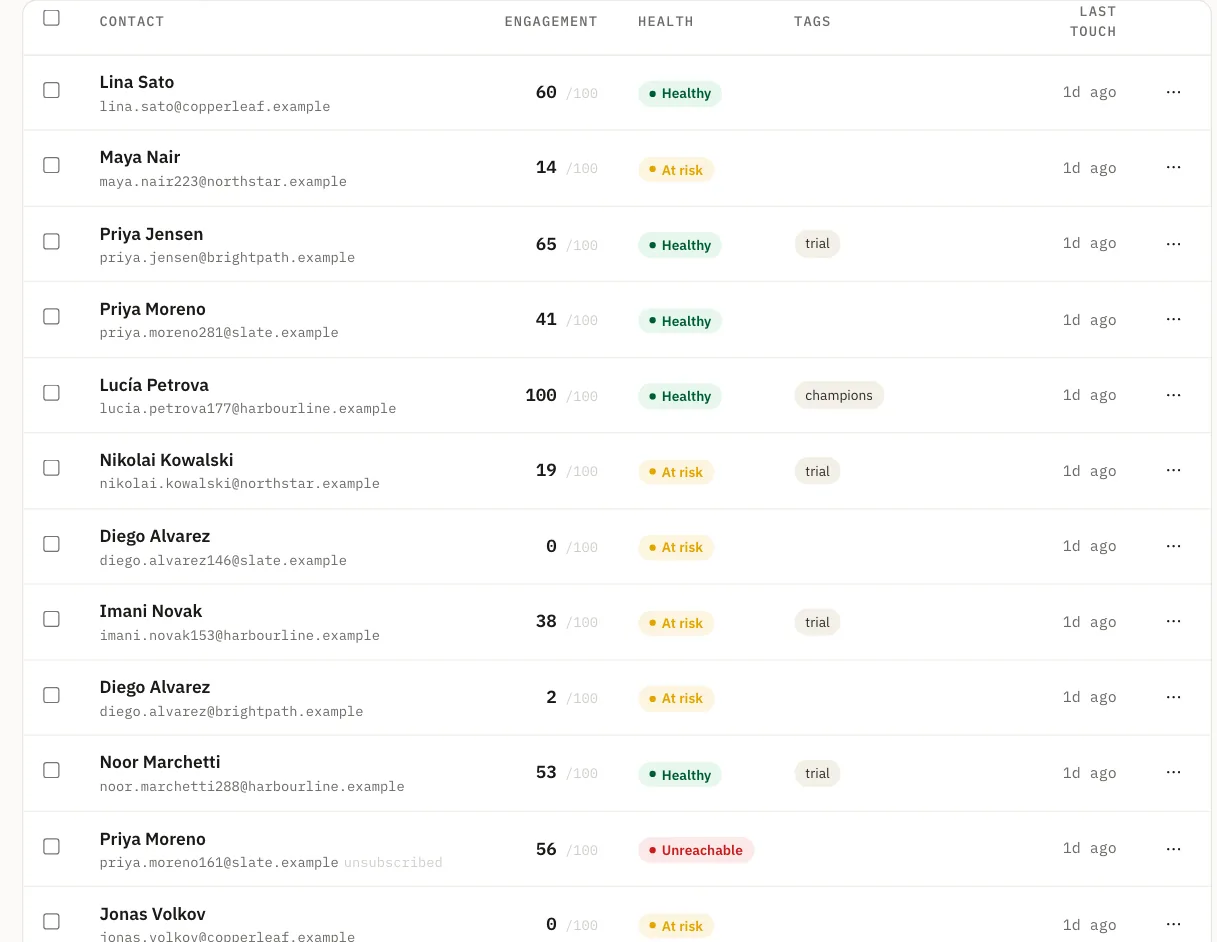
Unreachable
For a contact you reach by email, Unreachable means any of these:
- There is no email address on file.
- The address hard bounced.
- They marked your email as spam.
- They unsubscribed, or you turned off their email consent.
No amount of past engagement changes this label, because the problem is the address or the permission, not the relationship.
At risk
You can reach them, but their engagement score is under 40. The score runs from 0 to 100 and is built from clicks, replies and purchases, with recent activity counting more. Opens play no part, because mail apps record opens nobody made. On the score’s tiers, under 40 covers everyone dormant or cold and most of warm: people who used to act on your email and have mostly stopped, as well as people who never started.
Healthy
Reachable, and a score of 40 or more. They act on what you send.
Three contacts, three labels
An example makes the order concrete. Three people on the same list:
| Contact | Situation | Label |
|---|---|---|
| ana@example.com | Bought twice this spring and replies often, but her address started hard bouncing last week | Unreachable |
| ben@example.net | Subscribed, address fine, clicked a few links last year and nothing since | At risk |
| chen@example.com | Subscribed, clicks most newsletters and replied last month | Healthy |
Ana has the strongest history of the three and the worst label, which is the point. The right move for her is to find a working address, perhaps from her next order, not to send her a re-engagement campaign that will bounce. Ben is the one a well-chosen email could still bring back.
Why the order matters
Checking Unreachable first means the At risk group contains only people you can still do something about. If an address bounced, it shows as Unreachable even if its score is high, so it never inflates your list of fading relationships, and it never sits in Healthy looking fine.
You can filter the contact list by health, and the filter is built from the same rule as the label on each row. “At risk” in the filter is exactly the set you see labelled At risk.
What to do with each group
- Unreachable: nothing to send. If the address is wrong rather than dead, correct it. If someone unsubscribed, leave them be.
- At risk: this is where attention pays. Look at what they last clicked or asked about, and send something relevant to that rather than your next general campaign. Contacts who stay silent long enough, with three or more emails behind them and a score of 10 or under, will appear on the sunset list.
- Healthy: keep doing what works, and watch who leaves this group.
A useful weekly question: who moved to At risk, and what did they last engage with? A handful of names each week is a list you can act on by hand. A sudden jump is a signal about your recent campaigns rather than about the contacts, and worth a look at what you sent.
Limits
- The list and the filter read the stored engagement score. It is refreshed on a schedule, and straight away after a click or a purchase. The contact page works the score out live, so a contact close to 40 can read differently there for a while, usually because older activity has aged since the last refresh.
- The label reads the contact’s own status and consent. An entry on your do-not-send list at the marketing level, such as one added from the sunset list, stops marketing email but does not by itself change the label.
- The threshold of 40 is fixed. It is a starting point for attention, not a verdict on a customer.