A pre-send checklist for email campaigns that ends at the fix
Before a campaign sends, check the email, the audience, the sending domain and your limits, and make every problem you find point to the place it is fixed. Email Digit runs that review on every campaign, links each warning to the right screen with a way back to where you were, and keeps the Send button locked until failures are fixed and warnings are confirmed.
A pre-send checklist for any campaign
Whatever you send with, these are the questions to answer before the button:
| Area | Check |
|---|---|
| Content | No unfinished text, no placeholder copy, merge fields fill in, no phrasing that reads like spam or phishing |
| Links | Every link works and goes to your own domain, not through a public link shortener |
| Audience | Unsubscribed and bounced people removed; nobody already emailed too often this week |
| Sender | Sending domain authenticated with SPF and DKIM; a DMARC policy published |
| Compliance | A working unsubscribe and your postal address in the footer |
| Capacity | Today’s sending limit, your monthly allowance and, for a new domain, a sensible volume |
| Timing | A send time that suits where your readers are |
Most of these are not hard to check. The trouble is that a warning such as “domain not ready” tells you there is a problem and then leaves you to find the setting, lose your place, and come back to rebuild the campaign. That is half a warning.
The review in Email Digit
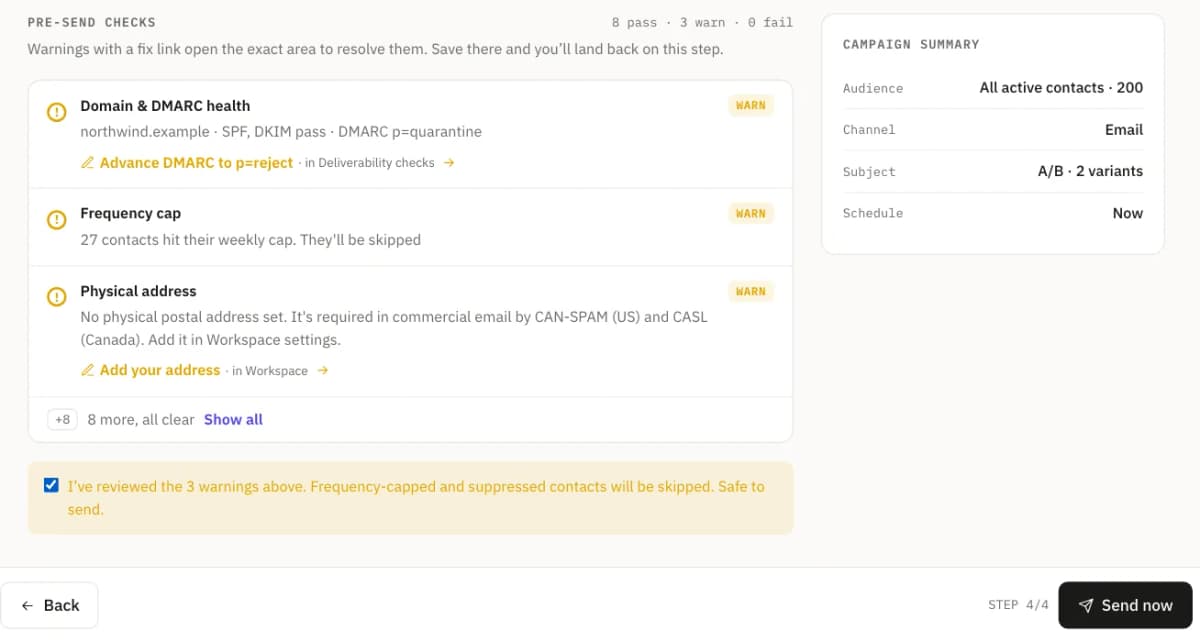
The last step of the campaign composer is a review list. Which items appear depends on the campaign, your domain and your plan, and each one is marked pass, warning or failure. It covers:
- Spam phrasing. A lint of the subject and body, with the issues it found.
- Links. How many links redirect through a shortener, which can lower trust.
- Suppressions. How many unsubscribed or bounced contacts were removed.
- Domain and DMARC. Whether you have a verified sending domain (without one the send is blocked), and whether its DMARC policy has reached
p=reject. - Weekly cap. How many contacts have already reached the weekly limit on marketing email and will be skipped.
- Daily quota and monthly allowance. Whether today’s sending and this month’s plan allowance cover the audience.
- Warm-up or sending allowance. Whether the volume suits how new your domain is and how much it has sent, or, on accounts with a daily sending allowance, how many go today and how many follow as it resets.
- Postal address. Whether you have one set; it is added to the footer of marketing email.
- Content. Whether the body is finished, and whether it passes the content policy.
- Send timing. Advice on the send time for your audience, when there is any to give.
Three things that make it useful
Every warning ends at the fix
A warning comes with a link that opens the screen where it is fixed: Domains to verify a domain, Workspace to add your postal address or see your allowance, the deliverability checks to move DMARC forward, the Message Builder to edit the email. A banner on that screen takes you back to the review, with the campaign as you left it.
The Send button says why it is locked
Failures block the send. Warnings must be confirmed before Send is enabled, so a red flag cannot be skipped without a decision. And a campaign can never go to zero recipients. When the button is disabled it names the first thing in the way, such as “Fix the failed checks above” or “Confirm the warnings above”.
Limits are shown as a split, not an error
If the audience is bigger than what is left of your monthly email allowance, the review tells you how many go now and how many go when the allowance resets on the 1st. For example, with 1,200 emails left this month and an audience of 3,000, the first 1,200 go now and the other 1,800 on the 1st, or you can upgrade. You see that before you send, not as a half-failed campaign afterwards.
Two checks that always block
An unfinished placeholder. If the AI writer was unavailable while drafting, the email falls back to a placeholder draft. If the body is still that placeholder, the send is blocked with a link to finish the email. The same guard runs again when the send starts, so it cannot be skipped.
Content policy. This is the only content check that can block a send. Phrasing that resembles a phishing email is a warning worth a second look; content that breaks the policy is a failure. It is checked again at send time too. The spam phrasing lint is deliberately separate and only ever advises: it is there to help a legitimate sender reach the inbox, not to police them.
What the review does not do
- It does not promise inbox placement. Passing every item means the known problems are absent, not that every mailbox provider will deliver to the inbox.
- It does not change your DMARC policy for you. Moving to a stricter policy is your decision and a one-click step; it never happens on its own.
- It is not a fixed number of checks. Items appear or disappear with the campaign, the domain and the plan, so two reviews can look different.
A check should end at the fix, not at the message. If you have not set up a sending domain yet, you can check your domain for free first, or read why DMARC can fail when SPF and DKIM pass.