Which email webhook events to subscribe to
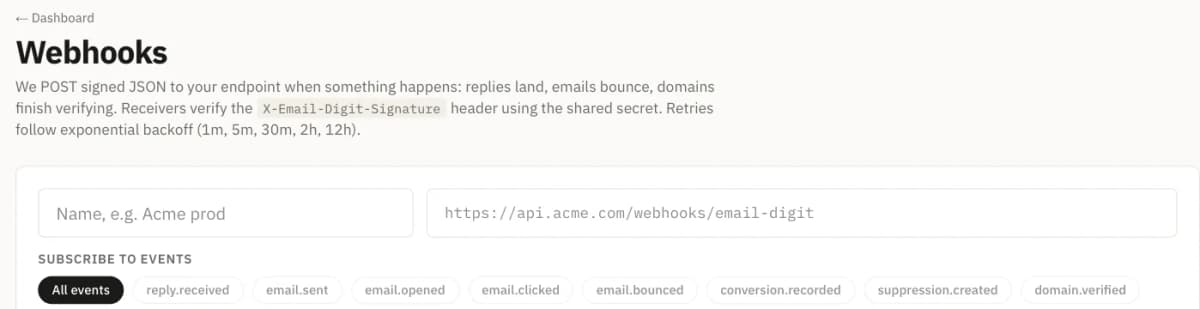
Subscribe to the events you will act on this week, by name, rather than to everything. For most teams that is suppression.created (keep your own do-not-send list in step), domain.drift and domain.failed (a sending domain needs attention), and reply.received or conversion.recorded if another system needs to know when someone answers or buys.
Why subscribing to everything is a trap
A catch-all subscription feels safe: nothing is missed. In practice it means your endpoint receives events nobody has written code for, your logs fill with them, and the one that matters is buried. It also means a handler that throws on an unknown type starts failing on the day a new event is added.
A short, named list is easier to test, easier to monitor and tells the next engineer what the integration is for. Adding an event later is one edit.
The email events, grouped by the question they answer
Email Digit’s events have flat names in the form resource.past_tense. You subscribe to a list of names, or to * for all of them. There are no family wildcards such as reply.*, so a subscription says exactly what it receives.
What happened to a message
| Event | Fires when |
|---|---|
email.sent | A message was accepted for sending, with the campaign, sequence, journey or flow that sent it. App email from the transactional API also says its stream. |
email.bounced | A message failed when we tried to send it, with the error. |
email.clicked | A tracked link was followed, with the URL. |
email.opened | A tracking pixel loaded. Display only, see below. |
Two notes. email.bounced is a failure at the moment of sending. A bounce or spam complaint that a receiving server reports afterwards adds the address to your suppression list, and that arrives as suppression.created, so subscribe to both if you track bounces. And email.opened is not a signal of interest: some mail apps load images for privacy reasons whether or not anyone reads the message. Do not trigger anything from it.
What a person did
| Event | Fires when |
|---|---|
reply.received | A reply arrived and was classified, with its intent, priority and risk flags. |
conversion.recorded | A conversion was recorded, with its value and the campaign it is attributed to. |
suppression.created | An address must not be emailed again: its scope (all or marketing) and the reason. |
One limit to know: reply.received fires for replies that another mail service passes to your workspace’s inbound webhook. Replies read from a connected mailbox appear in your inbox but do not currently fire it.
Whether your setup still holds
| Event | Fires when |
|---|---|
domain.verified | A sending domain finished verifying. |
domain.failed | A verification check on a sending domain failed, including when automatic re-checks give up. |
domain.drift | A monitored domain’s health score fell by 10 points or more between two checks. |
mailbox.connected | A mailbox was connected for reply reading. |
Automations and testing
automation.fired: a reply rule on the Automations page ran its actions. It is not sent for steps in canvas flows.test.ping: sent when you press Send test on a subscription in the dashboard.
A starting list for common jobs
Start from the job your endpoint does, and subscribe to the events that job needs. Everything else can wait until someone has a use for it.
| If your endpoint | Subscribe to |
|---|---|
| Keeps a CRM or customer database in step | reply.received, conversion.recorded, suppression.created |
| Pages whoever looks after email setup | domain.failed, domain.drift |
| Sends email of its own from another system | suppression.created, so an address that bounced or complained here is not emailed from there |
| Feeds product analytics | email.sent, email.clicked |
suppression.created appears three times for a reason. It is the event that protects your sending reputation outside Email Digit, and it is the one most often left out.
Write the parser before the first real event
Every event comes in the same envelope: a payload version, an id, a type, a mode (live or test), a timestamp and a data object. Only data changes shape between events. The mode field, also sent as a header, tells live traffic from traffic caused by a test API key, so a production handler can act on one and log the other. While signed in, you can fetch a sample payload for every event type from the API, wrapped in the same envelope as real deliveries, so you can write and test your handler before anything real happens. Treat the sample’s data as a guide to the shape, and check it against the first real event.
Then, before relying on the subscription:
- Press Send test. A
test.pingconfirms the URL, the signature check and your 2xx. - Make your handler ignore event types it does not know, rather than throwing.
- Store each event id you process, so a retry or a replay is handled once.
The signing secret rotates in one click, for the day someone leaves the team or a secret turns up in a log. The new secret is shown once and replaces the old one straight away. How signatures, retries and replay work is covered in verify, retry and replay email webhooks.