Start an email automation from your app with one API call
Have your app report what happened (a signup, a first project, a cancelled plan) as an event, and let an automation decide which emails follow. In Email Digit, an API event is one POST with the same shape as the send API, it starts a flow on the same canvas marketers use, and the flow can be edited and republished while your code keeps firing the same event.
Two automation systems is one too many
Product teams often end up with two places that send lifecycle email. Marketing owns a sequence tool with a visual editor. Engineering owns a pile of scheduled jobs: “three days after signup, if they have not created a project, send this”. Each works. Together they double-send, contradict each other, and turn every copy change into a ticket for an engineer.
The split usually happens because the marketing tool cannot hear what happens inside the product, so engineering writes the logic itself. The fix is to divide the work differently: code reports facts, and the automation, which marketing can edit, decides what to send.
Design events as facts, not as emails
- Name what happened.
user.signed_uporproject.first_created, notsend_welcome_email. The flow behind an event will change; the fact will not. - Send the data the email needs. Pass the first name, the plan, the link, as variables, so the email never has to look anything up.
- One recipient per event. An event is about one person.
- Give each event an idempotency key from your own data, such as the signup id, so a retried request cannot start the flow twice.
Keep the logic about timing and content out of your code. “Wait three days, then send the getting-started tips” belongs in the flow, where a marketer can see it and change it. Your code only needs to report the signup.
Firing a flow from code in Email Digit
A flow can start in six ways: manually, when someone joins a segment, when they get a tag, when they reply, on a date field such as a renewal date, or on an API event. An API-event flow has a trigger key, and your app fires it like this:
curl -X POST https://api.emaildigit.com/api/automation-flows/events \
  -H "Authorization: Bearer $ED_API_KEY" \
  -H "Content-Type: application/json" \
  -d '{
    "trigger_key": "user.signed_up",
    "to": "sam@example.com",
    "variables": { "first_name": "Sam", "plan": "Starter" },
    "idempotency_key": "signup-20931"
  }'
That is the same API key, header and request shape as the transactional send API, so if your app already sends a password reset, firing a flow is one more call, not a new integration. It answers 202 with the flow and enrollment ids.
The rules worth knowing before you ship it:
- The flow must be active and built on the transactional stream. Otherwise the call returns
404, which is also what a mistyped trigger key gets. - The API key needs the
email:sendscope. - Known contacts are linked. If the address belongs to a contact, the enrollment is attached to them, so conditions and goals in the flow can use their data. An address that is not a contact is enrolled on its own.
- A contact goes through a given flow once. A second event for someone who is already a contact and already enrolled returns
409. If an event can genuinely repeat for the same person, such as one email per order, use a transactional journey through the send API instead. - Retries are safe. The same idempotency key returns the original enrollment with status
duplicate. - The trigger key locks once used, so nobody can rename it in the dashboard and break your production calls.
Because the flow is transactional, the weekly limit on marketing email does not apply to it. A recipient who hard bounced or marked your mail as spam is still never sent to.
Editing a flow that is already live
This is where splitting the work pays off. The event is fixed in your code. The emails behind it are not, and changing them does not need a pause or a deploy:
- Open the active flow. Your edits go into a draft; the live version keeps running.
- Publish the draft. It becomes a new version, without pausing the flow.
- New events enter the new version. Contacts already inside finish the version they started, so nobody jumps into the middle of a sequence that has changed around them.
- If the new version is wrong, roll back. The version list shows who published each one, and rolling back republishes the earlier graph as a new version, so the history stays intact.
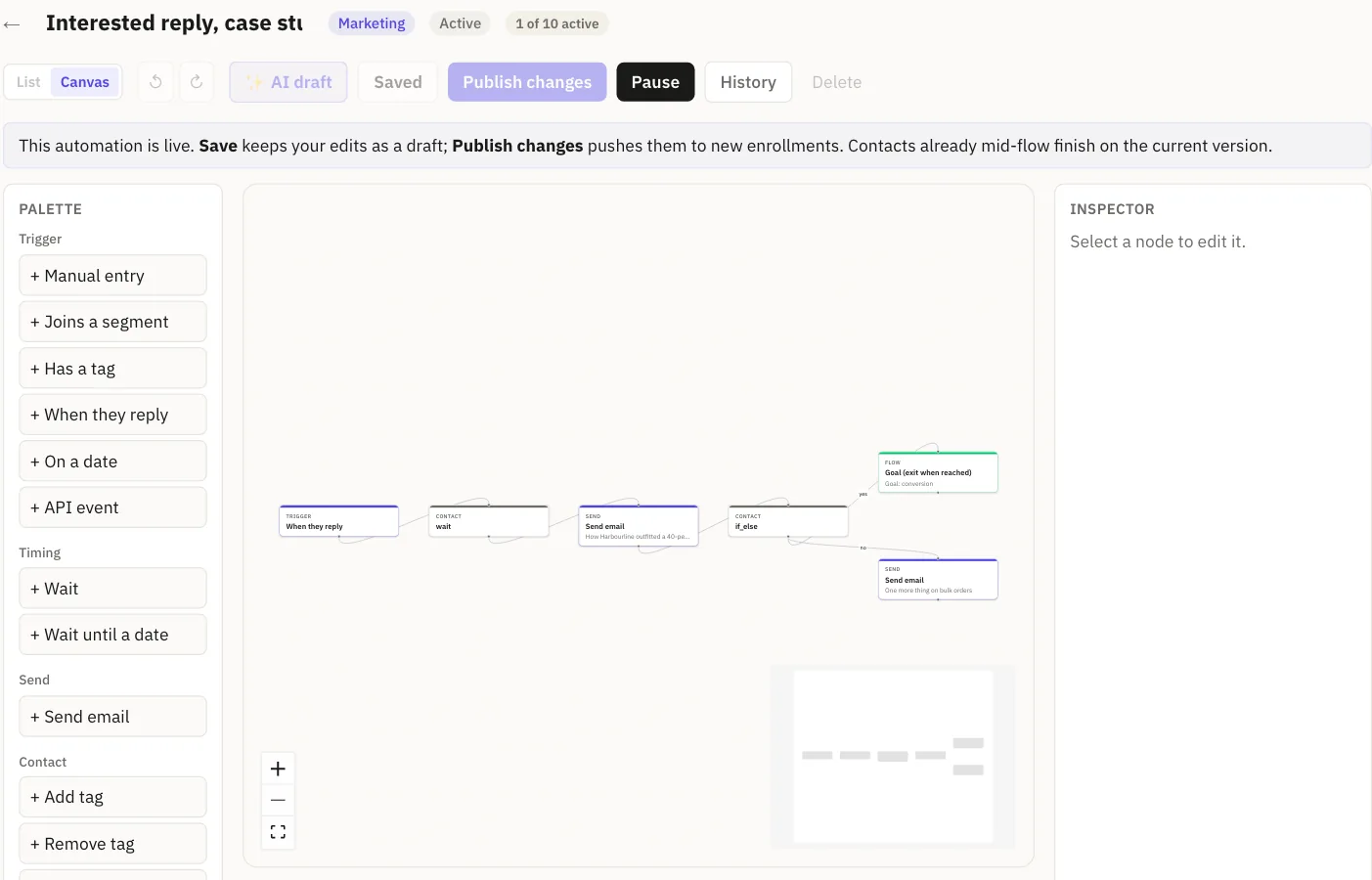
Marketing can rewrite the onboarding emails on Tuesday while your code keeps sending user.signed_up exactly as it did on Monday.
Limits
- API events start transactional flows only. Marketing flows use the other five triggers.
- Waits are minimums. A step runs when the scheduler next picks it up, so a three-day wait means at least three days, not an exact time.
- There is no client library. The API is plain HTTPS and JSON; the docs have curl, JavaScript and Python snippets.
For the retry side of the same API, read retry a transactional email without sending it twice.