Follow up with non-responders, not non-openers
Follow up once, a few days after the first send, with a different angle, and only to the people who did not reply, click or buy. Build that list from actions a person has to take, not from opens: mail apps now record many opens automatically, so a “non-openers” list quietly skips people who never saw your first email.
Why “resend to non-openers” stopped working
The old trick was simple to explain. Send a campaign, wait, then send it again to everyone who did not open it. Opens were measured by a tiny image in the email, and loading that image was taken as proof that someone looked.
Apple Mail Privacy Protection changed that. It loads images, including the tracking image, before the reader does anything, and some security scanners do the same. An open gets recorded whether or not a person read the email. Two things follow:
- Your non-opener list shrinks. Many people who never read the first email now look as if they did, so they are left out of the follow-up meant for them.
- The people left on it are not the ones you think. They are mostly people whose mail app does not preload images, which says more about their software than their interest.
The fix is to change the question. Instead of “who did not open”, ask “who did not respond”, and count only responses a machine cannot produce on someone’s behalf.
What counts as a response
| Signal | Counts as a response? | Why |
|---|---|---|
| Reply | Yes | Somebody wrote back. Nothing fakes that. |
| Conversion | Yes | A purchase or goal you report, credited to the campaign. |
| Click | Yes | A person chose a link. Scanners can click too, so it is imperfect, but it errs toward leaving someone out rather than mailing them twice. |
| Open | No | Often recorded by the mail app, not the reader. |
How to write a follow-up that is worth sending
The audience is half the job. The other half is not sending the same email twice.
- Wait a few days. Replies and clicks keep arriving for a while after a send. Follow up too soon and you mail people who were about to respond.
- Change the angle, not only the subject. If the first email led with the offer, lead with the problem it solves. If it was long, make this one short. Someone who skipped the first version is unlikely to want the same one again.
- Write a new subject line. To anyone who did see the first email, a repeated subject reads as a resend.
- Send it once. One follow-up catches people who missed the first email. A third and fourth send mostly produce unsubscribes and complaints, which cost you with everyone else on the list.
How Email Digit builds the follow-up
On the report of a sent campaign, Follow up with non-responders creates a new draft campaign called “Follow-up:” plus the original name, and opens it in the composer with the audience already chosen. The subject and body are copied over as a starting point for you to rewrite. A/B testing starts switched off, since a follow-up is not a fresh subject test.
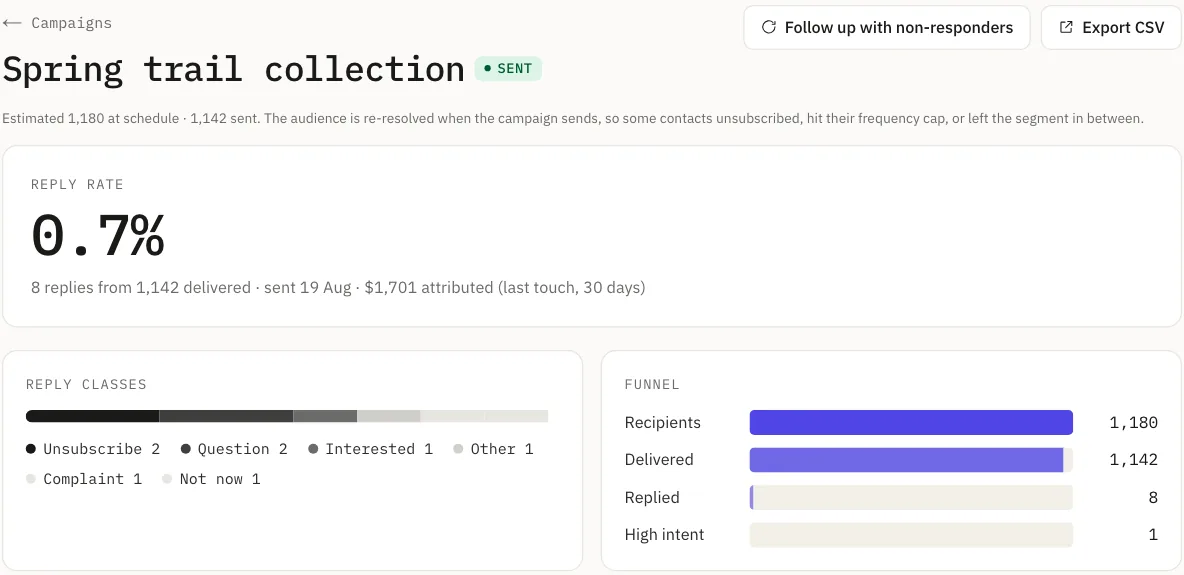
The audience is everyone who was sent the original campaign, minus anyone who, since their own send:
- clicked a link in that campaign’s email,
- had a conversion attributed to that campaign, or
- replied to you.
Opens are never part of it. Email Digit records opens and shows them, marked as unreliable, but does not count them toward any score, segment or goal.
The follow-up then goes through the same rules as any other campaign. Suppressed addresses are removed, the weekly frequency cap still applies to each contact, and only subscribed contacts with an email address are included, so nobody who unsubscribed after the first send gets the second. The list is worked out again when you look at the estimate and when you send, so anyone who replies or clicks while you are editing drops out without you doing anything.
What it does not do
- It does not send by itself. It creates a draft. You edit it and send it, now or on a schedule, like any other campaign.
- It needs a sent campaign. The button appears once the original has sent and delivered at least one email. Before that there is nobody to follow up with.
- A reply about anything counts. Replies are not tied to a particular campaign, so a person who wrote back after your send, even about something else, is treated as having responded. It leans toward mailing someone less, which is the safer mistake.
- It is a one-off. It is not a repeating sequence. For a series of emails over time, use an automation instead.
The aim is not to email people more. It is to stop skipping the people who never saw the first one. For how replies, clicks and conversions add up to a contact’s engagement score, read Stop paying for contacts who never engage, or see how campaigns work on the marketers page.