An API key leaked: spot it, contain it, replace it
If an API key turns up in a public repository, a log file or a screenshot, work through four steps in order: confirm what it is, assess what it can do, cut it off, and replace it everywhere it was used. Email Digit keys are designed to make each step quick: the prefix says whether the key can send real mail, the keys page shows when each key was last used, and a key can be revoked from the dashboard at once.
Plan for the bad day before it happens
Keys leak in ordinary ways: a .env file committed by mistake, a debug log that prints request headers, a screen share, a support ticket with a pasted curl command. The damage depends less on how it leaked than on two things you decided earlier:
- How much the key can do. A key that can only record orders is a nuisance if it leaks. A key with full access to your account is an incident.
- How many places share it. One key per integration means one key to replace. One key shared by five services means five deployments under pressure.
The four steps
1. Spot it
Every Email Digit key starts with ed_test_ or ed_live_. A fixed prefix gives secret scanners, in your code host or your own tooling, a pattern to match, so a committed key is more likely to be caught early. Add both prefixes to any scanner you run on logs or tickets.
2. Assess it
The key itself tells you most of what you need:
| Check | Where | What it tells you |
|---|---|---|
| Prefix | The key | ed_test_ is sandbox: sends are recorded but never delivered. ed_live_ sends real mail. |
| Scope | What you chose when you created it; the API keys page does not list it yet | Whether it can send email, record orders, or do everything |
| Last used | The API keys page | When it was last used |
A recent last-used time, at an hour your systems were quiet, is the sign the key has been used by someone else. The IP address of each key’s last use is recorded too, but the dashboard does not show it yet. A test key that leaked still deserves replacing, but it cannot email anyone.
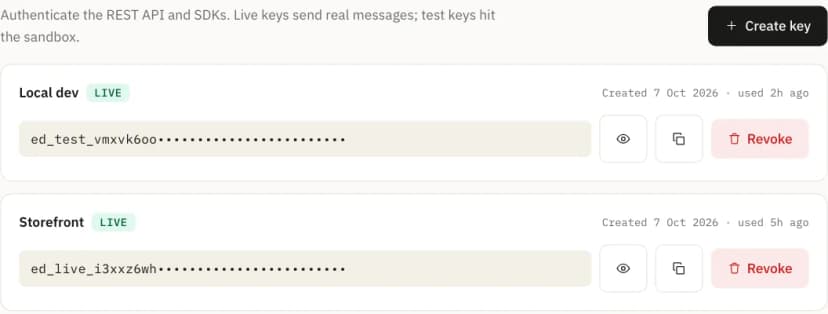
Write down what you find before you change anything: the key’s name, prefix, scope and last-used time. Once the key is revoked you will want that record for the follow-up, and for telling anyone affected what the key could and could not have done.
3. Contain it
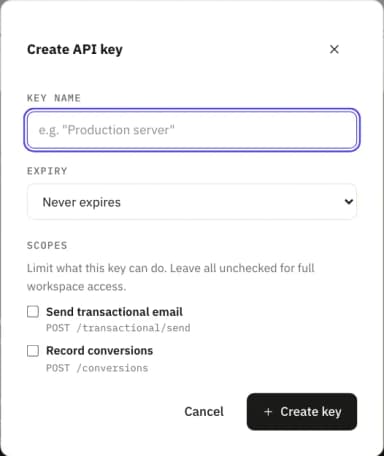
Scopes limit what a leaked key can do, which is why they are worth setting before anything goes wrong. A key can be limited to either or both of two scopes:
email:send: sending app email through the send API, and starting API-event automations.conversions:write: recording orders. A checkout with this key can report revenue and cannot send a single email.
A key with no scope has full access to the workspace. That is the default for compatibility, and it is the one to avoid for anything running outside your own servers. A key can also carry an expiry date (30 days, 90 days or a year in the dashboard, or any number of days up to ten years through the API), so a key made for a short project stops working on its own.
4. Replace it
In the dashboard, the API keys page has create and revoke. Replace the key in this order:
- Create a new key with the same mode and the narrowest scope that works. Keep a sandbox integration on a test key, so it never turns into a live one by accident.
- Deploy it everywhere the old key was used, and confirm traffic has moved.
- Revoke the old key. It stops working immediately, and revoking is permanent.
If the last-used time shows someone else is already using the key, swap the order: revoke first and accept a few minutes of failed requests while the new key ships. A few failed requests cost less than mail sent in your name.
The API behind the dashboard also has a rotate action that creates a replacement with the same name, mode, scopes and expiry date and revokes the old key in the same moment, with no overlap window. There is no button for it in the dashboard yet. Either way, the full key is shown once, when it is created; store it in your secret manager straight away, because it cannot be displayed again.
After the incident
- Check the workspace audit log. Key creation and revocation are recorded with who did it and from where.
- Remove the key from wherever it leaked, including history, even though it no longer works.
- Give each integration its own scoped key, so the next leak means replacing one key.
- Ask how it leaked, and fix that path: a missing ignore rule, a logger that prints headers, a habit of pasting full commands into tickets.
Limits
The drill above works with any provider that gives you prefixes, scopes and last-used data. These are the edges of what Email Digit offers today:
- Two scopes exist today. Anything else needs an unscoped, full-access key.
- The dashboard has no rotate button: replace a key by creating a new one and revoking the old.
- Only Admins and Owners can create or revoke keys.