Tell a lead from a sales pitch by who spoke first
You cannot tell a lead from a sales pitch by the words alone. You can tell by the relationship: did you email this person first? Before Email Digit’s AI reads a reply, it checks whether you have sent the sender a campaign, whether they are already a contact and how many exchanges you have had, and it treats those facts as more important than how warm the message sounds.
Why the same sentence means opposite things
“Would love to set up a quick call this week, I think there is a great fit here.”
If you emailed that person last Tuesday, this is a lead saying yes. If you have never heard of them, it is someone trying to sell you something, using exactly the language a lead would use. Cold outreach is written to sound like interest. That is its job.
Anything that reads each message in isolation, whether a keyword rule, an AI model or a tired person at the end of the day, will mark both as hot leads. The cost is real: pitches land in your lead segments, they get tagged as interested, and the person who actually replied to your campaign waits behind them.
How to tell them apart by hand
Before you read the message, answer three questions about the sender:
- Did we email them first? Search your sent mail and campaign history for the address. A reply to something you sent is a different kind of message from a first contact.
- Do we know them? Are they in your contact list, a customer, a past lead?
- How much history is there? One cold message, or the fifth exchange in a conversation?
Then read the message in that light. A stranger who opens with praise and asks for a call, and whom you never contacted, is usually selling. A known lead who writes three words is often your warmest reply of the week.
The wording still gives clues once you know the direction. A pitch tends to talk about the sender (“we help companies like yours”) and to ask for a meeting before it asks a question. A lead tends to talk about their own situation and refer to what you sent. Neither clue is reliable alone, which is why the relationship comes first.
What Email Digit checks before the AI reads a word
For each new email reply that arrives, Email Digit works out four facts first:
- whether your workspace has ever sent a campaign email to this address;
- whether the sender is already one of your contacts;
- how many exchanges you have had, counting your campaign sends to them and their earlier replies;
- the reply goal you wrote for your workspace, if you wrote one.
From the first two, the message gets a direction:
| Situation | Direction | What the AI is told to lean towards |
|---|---|---|
| You have sent this address a campaign | Reply to your outreach | A lead or customer, with a sales or support topic |
| Never emailed, not a contact | Unsolicited inbound | If they are selling to you: a vendor or spam, never a lead, never “interested” |
| A known contact you have not emailed | Unknown | No lean; the message is judged on its content |
The instructions say the context outweighs the wording, however enthusiastic the message is. And it has consequences beyond the label: a reply read as a vendor or spam has its priority capped at 25 unless it carries a real risk such as a legal threat, and the sender gets no “interest” tag on their contact record, so pitches stay out of your lead segments.
Tell it what you sell
The fourth fact is yours to write. In Settings, the workspace owner can add a short reply classification goal, up to 2,000 characters, describing what you sell and who your customers are. One sentence like “We sell accounting software to small firms; agencies offering us marketing services are not leads” is read alongside every reply from then on, with no prompt to maintain.

Where context runs out
- Context is only as good as your history. A brand new workspace has sent nothing, so at first every sender who is not already a contact looks unsolicited and the wording carries more weight. It gets sharper as your sending history grows.
- The check is by email address, and it counts campaign sends. If a lead you emailed at work replies from a personal address, that address has no history, and the message is read as a first contact. Mail sent to them only by a sequence, an automation or your app does not count as having emailed them yet.
- Known but never emailed is left open. Someone imported as a contact whom you have not yet emailed gets no lean either way.
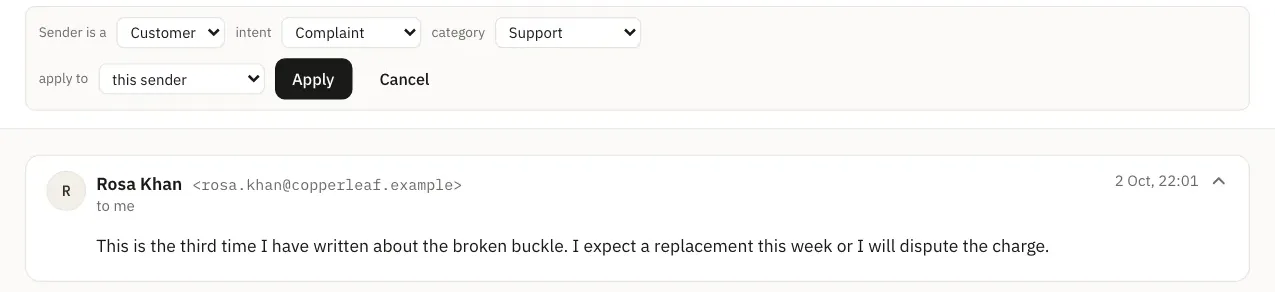
- It is a strong hint, not a guarantee. The AI can still misread a message. When it does, correct the sender type in the inbox and choose whether the fix applies to that sender, their whole domain, or this reply only. Sender and domain fixes become rules for future messages in your workspace.
For how the label then feeds the ranking, read How a reply priority score works, or see how replies are read.