What should happen when you correct a misread reply
When you correct how a reply was read, everything that came from the old reading should change with it: the priority, the risk flags and the review status. In Email Digit, saving a correction recalculates the reply’s priority and flags from the new labels, takes it out of the “Needs review” queue, and marks it as reviewed by a person so a later re-run never overwrites it.
Why a label change alone is not enough
Any system that reads replies for you will sometimes get one wrong. The common example is an eager stranger: “Love what you’re building, have you got 15 minutes this week?” reads like a hot lead, and it is a pitch from someone selling to you.
The easy design is to save the corrected label and leave everything else alone. The reply then sits in the inbox with the right label and the wrong everything else: still ranked where the old reading put it, still flagged for review, still counted as a lead in whatever report reads the old score. And the next time someone refreshes the inbox with newer logic, the correction can be quietly replaced by a fresh guess.
A correction should do three things, whatever tool you use:
- Change everything that was derived from the wrong label, straight away.
- Count as the review, so the same message does not need looking at twice.
- Be protected from being overwritten by the machine it corrected.
What you can correct
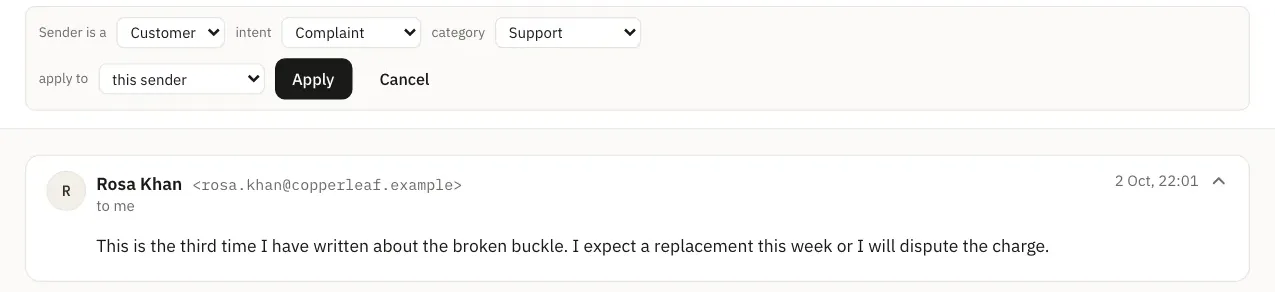
Under each reply in the Email Digit inbox there is a “Not right? Fix classification” control. You can change three of the readings:
- Party type: who is writing, such as a lead, a customer or a vendor.
- Intent: what they want, such as interested, a question or to unsubscribe.
- Category: what it is about, such as sales, billing or a complaint.
You also choose how far the correction reaches: this message only, every future message from this sender, or every future message from this domain.
What happens the moment you save
The score is recalculated. Priority is worked out again with the same calculation used when the reply arrived, now using your labels. Some corrections move it a long way:
| You change | What follows |
|---|---|
| Party type to vendor or spam | Priority is capped at 25, the ceiling for anyone selling to you |
| Category to complaint, or refund and return | Priority cannot sit below 66 |
| Category to contract or legal | Priority cannot sit below 72 |
| Intent to unsubscribe | The unsubscribe flag is added, so the request is not missed |
The cap on pitches is applied before the floors for serious risks. So a vendor who sends a real legal threat is still lifted to the legal-threat minimum of 85; relabelling the sender does not bury the threat.
The review flag clears. If the reply was marked “Needs review”, your correction counts as the review, and it leaves that queue.
It is marked as reviewed by a person. That mark matters later. The inbox has a “Re-classify” button that re-reads every stored reply with the latest logic. Replies a person corrected are skipped, so your judgement is not overwritten by a fresh guess.
Corrections that carry forward
If you chose sender or domain, the correction is saved as a rule for your workspace. Say you mark sales@example.net as a vendor with sender scope: the next message from that address is read as a vendor from the start. Domain scope covers everyone at example.net.
Every rule is listed under Settings, Workspace, with who created it and a link back to the reply that taught it. You can stop applying a rule without losing it, apply it again later, or delete it. Corrections stay in your workspace and are not used to train anything shared with other customers.
Choosing the right scope
The scope decides how much one correction teaches, so pick it deliberately:
- This message only when the sender is usually read correctly and this one was odd, for example a customer who forwarded a vendor’s offer to ask your opinion.
- This sender when the person is consistently one thing, such as an agency that pitches you every month.
- This domain only when everyone at that address is the same kind of sender. A domain rule on a shared mail provider’s domain would relabel thousands of unrelated people, so keep domain scope for company domains.
What a correction does not change
- Sentiment, urgency and intensity are not part of the correction. They keep the values read when the reply arrived, and still feed the score.
- Risk flags already found are kept. Recalculating can add a flag, for example the unsubscribe flag, but it does not remove one such as a legal threat.
- The contact record is not edited. A correction changes how this reply was read and, with sender or domain scope, how future replies are read. Tags already added to the contact when the reply arrived stay until you remove them.
- Re-classify has a cost. Re-reading the whole inbox counts against your AI classification allowance, and the confirmation says so. If only the keyword fallback is available, replies are left as they are rather than replaced with a weaker reading.
A correction should change the inbox now, not at the next message. Read more about how Email Digit reads replies.