Credit revenue to email and count each order once
To credit revenue to email honestly, record each order once, from your own backend, with your own order id attached, and credit it to the last email the buyer actually clicked. In Email Digit that is one request to POST /api/conversions. Send the order id every time: it is what makes a retry safe.
Why revenue numbers drift
Revenue per campaign is only as honest as the orders behind it. Three things usually inflate it:
- Retries. Your checkout calls the reporting endpoint, the request times out, and your code tries again. If the first call actually landed, the order is now counted twice.
- Double firing. A browser script and a server webhook both report the same purchase.
- Generous attribution. Crediting an order to an email the buyer merely opened. Opens are recorded by mail apps that preload images, so they credit email for sales it had no part in.
The fix for the first two is idempotency: a stable id per order, and a receiver that stores each id once. The fix for the third is a clear attribution rule that never rests on opens.
Last-touch attribution, stated plainly
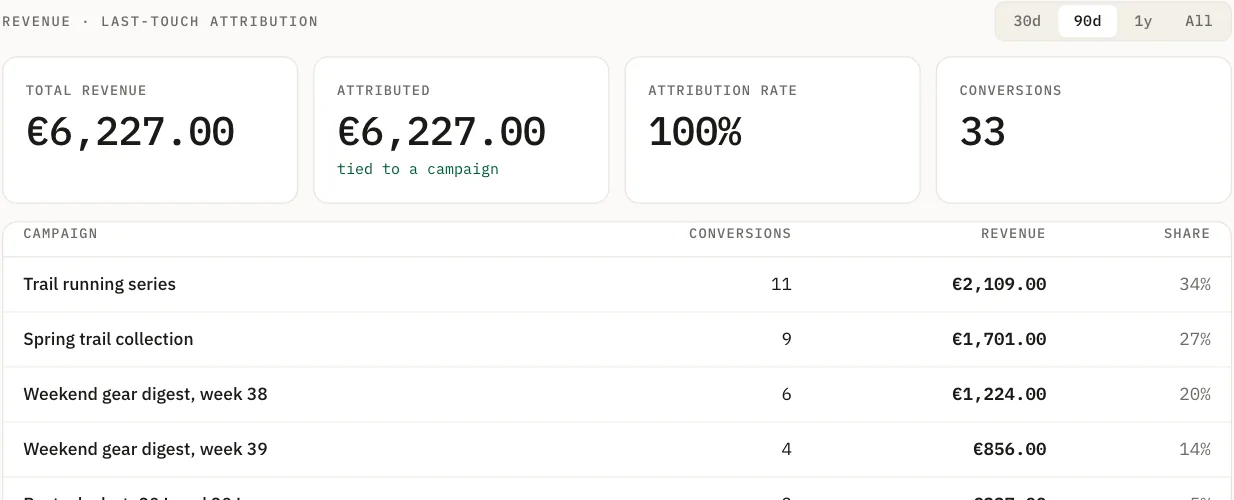
Last touch means one email gets the credit for an order: the most recent one that plausibly led to it. Email Digit applies it in this order:
- The most recent email the buyer clicked in the 30 days before the order.
- If they clicked nothing, the most recent email they were sent in those 30 days.
- If there is neither, or the email address is not one of your contacts, the order is still recorded and counts toward your revenue totals. It is not credited to a campaign.
That is the only model. There is no multi-touch split, and an open never earns credit. Last touch understates email that warms people up over several messages, so read it as a floor, not a ceiling.
The request
Your shop or backend sends the buyer’s email address, the amount in minor units (cents for dollars), the currency and your order id:
curl -X POST https://api.emaildigit.com/api/conversions \
  -H "Authorization: Bearer $ED_API_KEY" \
  -H "Content-Type: application/json" \
  -d '{
    "email": "maria@example.com",
    "value_cents": 1850,
    "currency": "USD",
    "external_id": "order-10482"
  }'
The response is the stored conversion, including the campaign it was credited to, if any. Two other fields are optional: event_name (it defaults to purchase) and occurred_at, for orders you report after the fact. A time in the future is treated as now, because it would break the attribution window.
The receiver checks the money before storing it:
- The currency must be a real currency code. Lowercase is accepted; an invented code is not.
- An implausibly large amount is refused with a message pointing at the usual cause, dollars sent where cents were expected.
- Revenue reports break totals down by currency and never add dollars to dirhams to produce one figure.
How each order is counted once
Two protections, one for each way an order gets counted twice:
| Situation | What Email Digit does |
|---|---|
The same external_id arrives again, after a timeout or a retry | Returns the conversion it already stored. Nothing new is recorded. |
| No order id, and the same contact, event name and exact value arrive within 10 minutes | Treats it as the same order and returns the first one. |
| Same contact and event, different value | Records it. That is a second purchase, not a duplicate. |
The ten-minute rule is a safety net, not a substitute. Without an order id, two genuine identical orders from the same person ten minutes apart would be merged, and an order from an address that is not a contact cannot be matched at all. Send the order id.
What changes when an order lands
- The contact’s engagement score updates straight away. A purchase is the heaviest signal in the score, ahead of a reply and a click.
- Automations with a Converted goal let the person go. Their place in those flows is closed in the same step, so no “still thinking about it?” email follows. See automation goals and branches.
- A
conversion.recordedwebhook goes to any endpoint you subscribed.
Keeping the numbers honest
Reconcile against your shop
Attribution you cannot reconcile is attribution you cannot trust. A few habits keep it honest:
- Compare the count of recorded conversions with your shop’s order count for the same period. A gap usually means some orders are not being reported, often a payment method or a checkout path that skips the call.
- Pull the reconciliation export from the API (
GET /api/conversions/export), a CSV that leads with your own order id, and match rows one to one against your order system. - Read revenue per currency. If you sell in more than one, there is no single total, by design.
Give checkout its own key
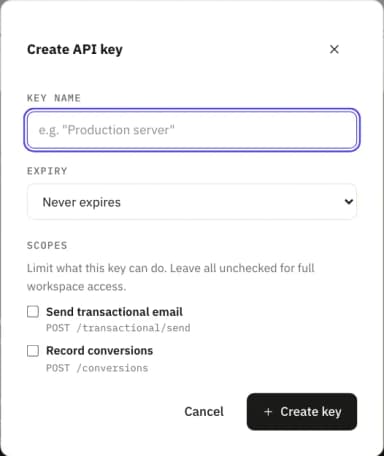
A key created with no scopes has full access, including recording orders. A key with scopes set needs conversions:write to record them. Create a key with only that scope for your checkout, so the code that records revenue cannot send email if it ever leaks.
The takeaway does not depend on any tool: report orders server side, attach your own order id every time, and attribute on clicks, never opens.