Reply playbooks instead of prompts: guardrails for AI drafts
Nobody should have to write a prompt to answer a customer. The rules that keep a reply safe (what it must say, what it must never say) belong in the product, chosen by the situation, not typed fresh by whoever is on shift. Email Digit’s “Suggest reply” starts from dropdowns already filled in from the reply’s classification and picks one of 19 built-in playbooks, each with its own goal and must-include and must-avoid rules.
Why prompts are the wrong interface for replies
A free-text prompt box puts the hardest part of the job on the person in the biggest hurry. To get a good draft for an unsubscribe request, they have to remember to say “confirm it, do not try to keep them, do not offer a discount”. For a contract question, “acknowledge it, do not interpret the terms, do not agree to anything”. Most people will type “reply politely”, and the draft will be polite and occasionally wrong in exactly the way the rule would have prevented.
Those rules do not change from message to message. They depend on the situation, and the situation is something you already know from reading the reply. So the rules can be written once, reviewed once, and applied every time.
How to write your own reply playbooks
Even with no software at all, a short playbook per situation helps a team answer consistently. Each one needs four lines:
- When it applies: the kind of sender and message, for example a customer asking for a refund.
- The goal: what a good reply achieves, in one sentence.
- Must include: the pieces every reply needs, such as the next step in the process.
- Must avoid: the things that cause damage, such as promising an amount or a date.
The must-avoid line is the one that earns its keep. It is where you write down the mistakes you have already made once.
How Suggest reply works in Email Digit
Open a reply and click Suggest reply. The dropdowns are pre-filled from how the reply was read: who the sender is, the category and the intent. You can change any of them if the reading is off. Then you choose:
- A tone: warm and professional, friendly and casual, formal and professional, concise and direct, empathetic and calm, or enthusiastic and upbeat.
- A length: short, medium or long.
- An optional note under “Anything else to mention”, up to 1,000 characters, for the detail only you know, such as “we are closed on Friday”.
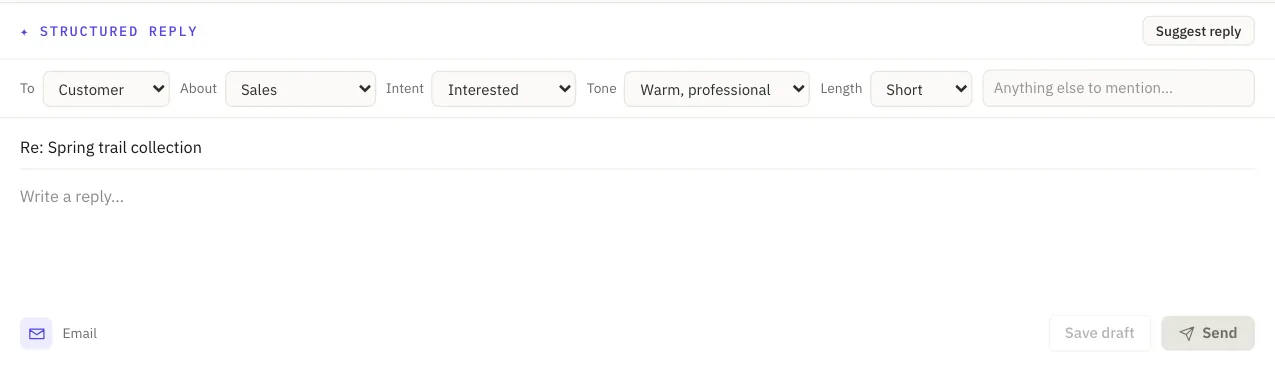
Email Digit then picks the most specific of its 19 playbooks for that combination, the one matching the most of sender type, category and intent, with a general playbook when nothing narrower fits. A few of them:
| Playbook | Goal | Must avoid |
|---|---|---|
| Unsubscribe | Confirm the opt-out respectfully and stop | Any marketing, asking them to stay, offers |
| Contract and legal | Acknowledge and route to the right person | Agreeing to or rejecting terms, legal interpretation, admissions |
| Refund and return | Acknowledge and set out the next step | Promising an amount or timeline that is not confirmed |
| Not now | Respect the timing and offer to reconnect later | Guilt-tripping, a hard call to action |
| Applicant | Thank them and explain the next step | Promising an interview or outcome |
The draft comes back written as an email, with a subject (reusing “Re:” when that reads naturally) and a sign-off. If your workspace has an active brand profile in Brand Studio, its voice is layered on top of the tone you chose. If you had already typed something in the reply box, you are asked before it is replaced.
The specificity rule matters when situations overlap. A support question matches both the general question playbook and the support question playbook; the narrower match wins, so the draft gives a full answer or asks for the one missing detail, rather than a generic reply. When two playbooks fit equally well, a fixed order decides, so the same situation always gets the same playbook. A message nothing narrower fits gets the default playbook: answer what they wrote, propose a sensible next step, invent nothing.
Guardrails that do not depend on the playbook
Every playbook shares one rule: never invent amounts, dates, order status or policy details. Where the draft needs one, it leaves a [[confirm: ...]] placeholder, and the reply cannot be sent until it is filled. Five playbooks (refunds and returns, complaints, billing and payment, contracts and legal, press) are escalation paths: a draft from them, like any reply flagged for review, needs a deliberate “Send anyway” before it goes. Nothing is ever sent automatically. The details are in AI reply drafts that leave blanks.
What it costs, and what it will not do
- Drafts use AI actions. A reply draft uses about 2 AI actions from your monthly allowance. When the allowance is used up, Suggest reply is refused until it resets; you can still write and send replies yourself.
- The playbooks are built in. You steer them with the dropdowns, the tone, the length and the note. Adding playbooks of your own is not supported.
- It drafts; you decide. A playbook makes a good draft more likely. It does not make reading the draft optional.
- Role. Suggesting and sending replies needs the Sender role or above.
See how replies are read, or compare AI action allowances on the pricing page.