Correcting an AI inbox: rules you can see, pause and delete
When you correct an AI inbox, the correction should become something you can see, switch off and delete, with a link back to the message that caused it. In Email Digit, a correction applied to a sender or a domain becomes a rule in a visible list, every reply it changes carries a RULE-APPLIED pill, and refreshing the inbox never overwrites a reply a person has corrected.
The problem with systems that learn quietly
“It learns from your corrections” sounds like a feature until something goes wrong. Six months later, replies from one partner keep landing as vendor pitches, and nobody can say why. Was it a correction? Who made it? Can it be undone without undoing everything else?
If learning is invisible, it cannot be audited, and it cannot be reversed. A correction made in a hurry on a Friday becomes permanent behaviour. So the useful test for any tool that learns from you is short: can you find what it learned, switch it off, and see what it touched?
Making a correction
Under each reply in the inbox is “Not right? Fix classification”. You set three things: who the sender is (lead, customer, vendor, partner, applicant, press, internal, spam or unknown), what they want, and what the message is about. Then you choose how far the correction reaches:
| Scope | What it changes |
|---|---|
| This reply | This reply only. No rule is saved. |
| This sender | This reply, plus every future reply from that exact address |
| This domain | This reply, plus every future reply from anyone at that domain |
The corrected reply is re-scored on the spot: its priority and risk flags are recalculated from the new labels, the “Needs review” flag is cleared, and it is marked as reviewed by a person. A saved rule applies to future messages; it does not rewrite other replies already in the inbox.
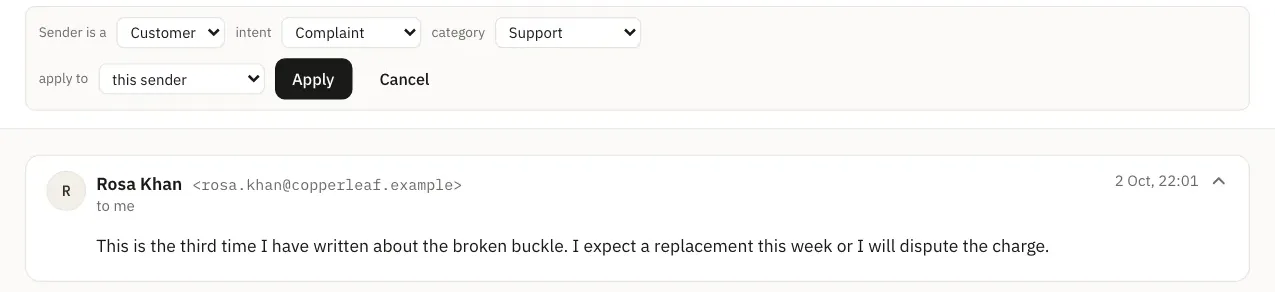
Choosing the right scope
A short rule of thumb keeps the list small and accurate:
- This reply when the message was unusual: a customer who writes once about a partnership, a supplier who happens to ask a sales question.
- This sender when the person will keep writing and is always the same kind of contact, such as a supplier’s accounts team.
- This domain when a whole organisation stands in one relationship to you, such as an agency that only ever pitches you, or a partner company whose staff all write about the partnership.
Seeing, pausing and deleting what it learned
Every rule appears in Settings, Workspace, under Reply classification. For each one you see:
- what it matches and what it sets, for example “From anyone at example.net, treat as Vendor”, followed by the intent and category;
- who created it and when;
- a “See the reply” link that opens the exact message that taught it.
And three actions:
- Stop applying this switches the rule off but keeps it, with its history. Future replies go back to the AI’s own reading.
- Apply again switches a stopped rule back on.
- Delete removes it for good, after a confirmation that says the record of which reply taught it goes too.
In the inbox, any reply whose labels were changed by a rule shows a RULE-APPLIED pill that links to the list, so you can always trace a label back to its cause.
Refreshing without losing your work
When the classification logic improves, you may want older replies read again. The Re-classify button in the inbox does that, with a live count of progress. Two protections are built in:
- Corrected replies are skipped. A reply a person fixed is the most valuable classification you have, so a refresh never replaces it.
- Nothing is downgraded. If only keyword scoring is available, for example because your AI classification allowance is used up, replies are left as they are rather than replaced with a weaker reading.
Re-classifying does use AI classifications from your allowance, and the confirmation dialog says so before it starts.
Limits and good habits
- Be careful with domain rules on shared domains. A domain rule matches everyone at that domain. On a company domain that is usually what you want; on a public email provider’s domain it would relabel every sender who uses it. Use the sender scope for individuals.
- A rule sets all three labels. Saving a sender or domain rule fixes sender type, intent and category together for future messages, so check all three before you save.
- Who can change rules. Making corrections and stopping or deleting rules needs the Sender role or above. Viewers can see the list but not change it.
- Your rules stay yours. Rules are per workspace. They teach your inbox and nobody else’s, and nothing you correct trains anything shared with other customers.
For how corrections fit into the wider reading of a reply, see Tell a lead from a sales pitch and how replies are read.