Mailchimp resend to non-openers, and what to do instead
Mailchimp lets you resend a campaign to the people who did not open it, and it is a fair way to follow up if you accept that an open is not proof of reading. Email Digit builds the follow-up list from people who did not reply, click or buy instead, because many opens are recorded by the mail app before the reader does anything.
How Mailchimp’s resend to non-openers works
These are the details from Mailchimp’s published help page on resending an unopened email, as we read it on 19 October 2026. Check Mailchimp’s current documentation before you rely on it, since plans and menus change.
- Eligibility. The campaign must be a regular email that has not already been resent, and open and click tracking must be on.
- Scheduled resend. The “Schedule Resend” option on the Campaigns page needs the Standard plan or higher. You pick a date and can change the subject line.
- Manual resend. Every plan can do it by hand: replicate the campaign, build a segment of subscribed contacts who were sent it but did not open it, then send or schedule.
- Timing. The page warns that unsubscribes and complaints become more likely when a resend goes out two or more days after the original.
The page does not mention Apple Mail Privacy Protection or how reliable opens are. That is the gap this guide is about.
Why a non-opener list misleads after Apple Mail Privacy Protection
An open is recorded when a tiny tracking image loads. Apple Mail Privacy Protection loads images ahead of time, and some security scanners do too, so an open can be logged for someone who never read the email. That is why open rates no longer tell you who read what, and why following up with email non-openers needs a better list than the one opens give you. Those people drop out of a non-opener list, and the follow-up meant for them never reaches them. What stays on the list is mostly people whose mail app does not preload images.
We cover the reasoning in Follow up with non-responders, not non-openers and on the reply intelligence page.
A non-opener list alternative: follow up on responses
On the report of a sent campaign, Follow up with non-responders creates a draft called “Follow-up:” plus the original name, with the subject and body copied over for you to rewrite. A/B testing starts switched off.
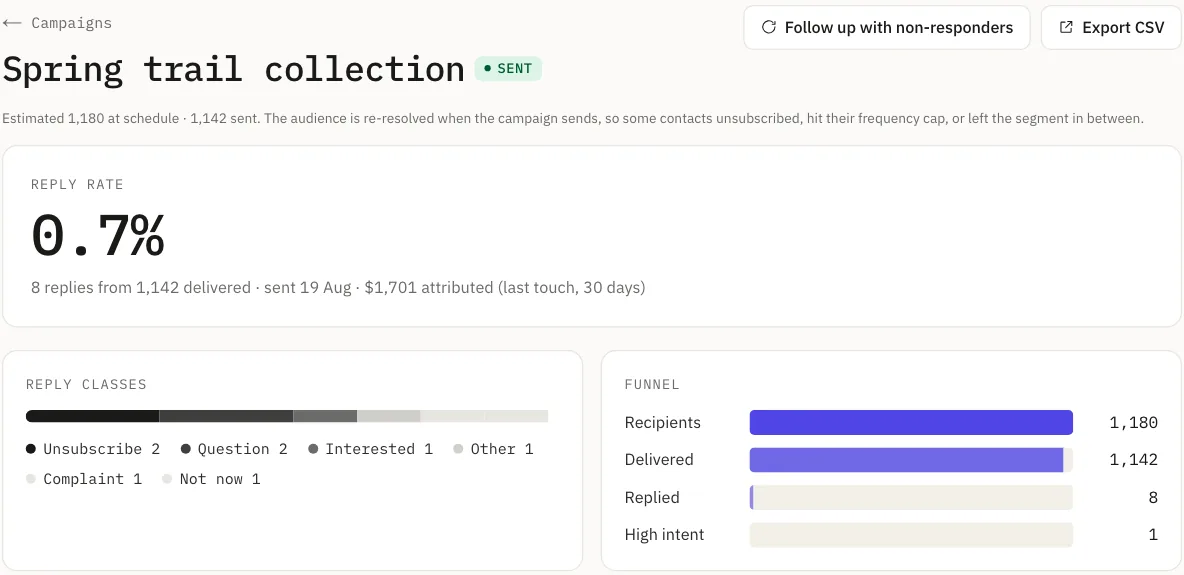
The audience is everyone sent the original campaign, minus anyone who, since their own send:
- clicked a link in that campaign’s email,
- had a conversion attributed to that campaign, or
- replied to you.
Opens are never part of it. The list goes through the same rules as any other campaign: suppressed addresses are removed, the weekly frequency cap still applies to each contact, and only subscribed contacts with an email address are included. It is worked out again when you look at the estimate and when you send, so anyone who replies while you are editing drops out.
The two approaches side by side
| Compared | Mailchimp resend | Email Digit follow-up |
|---|---|---|
| Who gets it | Contacts sent the campaign who did not open it | Contacts sent the campaign who did not reply, click or convert |
| Needs open tracking on | Yes | No, opens are not used |
| Built how | A scheduled resend, or a segment you build by hand | One button on the report, which opens a draft |
| Sends by itself | Yes, when you schedule a resend | No, you edit the draft and send it |
What else Email Digit does around a follow-up
We only checked Mailchimp’s resend page, so we make no claim about what the rest of Mailchimp does or does not do. These are the parts of Email Digit that sit around the follow-up:
- Replies are the headline number. Among email campaign engagement metrics, reply rate is the one a mail app cannot fake, so reports lead with it and show opens marked as unreliable.
- Subject tests are judged by replies. The A/B winner is the subject with the higher reply rate. The whole audience is split between the two subjects; there is no small test group followed by the winner going to everyone else.
- Replies land in one inbox. Each reply is read, ranked and given a suggested draft, so you see who answered before you decide who to follow up.
- Automation goals ignore opens. A flow can stop when a contact buys, converts, replies or becomes engaged, and it has no goal or branch based on an open.
- Pre-send checks before every send. Spam score, links, authentication and recipient counts are checked before you press send.
Where Mailchimp’s setup suits you better
- You want the resend to go out without a manual step. Email Digit creates a draft; you send it. It is not a scheduled resend.
- You want to build your own segment. Email Digit has a set of built-in segments and the follow-up audience, but not a custom segment builder yet.
- You want to split the audience further. The follow-up is one combined group. There are no separate lists for people who did not click and people who did not reply.
- You want a bigger template library. Mailchimp has more templates.
What the follow-up does not do
- It is email only.
- It needs a sent campaign. The button appears once the original has sent and delivered at least one email.
- A reply about anything counts. Replies are not tied to one campaign, so a person who wrote back after your send, even about something else, is treated as having responded. That leans toward mailing someone less.
If you want to try it, see how campaigns work on the marketers page. Every paid plan starts with a 14-day trial, card required, cancel any time.