How to do email marketing, step by step

To do email marketing, collect addresses from people who agreed to hear from you, connect a sending domain so your mail is authenticated, write one email with one purpose, test it, send it to a clear audience, and judge it by replies, clicks and purchases. Then change one thing and send again. The steps below take you from nothing to a first campaign.
Step 1: Decide what the first campaign is for
Pick one outcome before you write anything. Good first goals are small and measurable: replies to a question, sign-ups for an event, or purchases of one product. A campaign with three goals usually does none of them well, because the reader does not know what to do.
Write the goal down in one sentence, for example "Get 20 replies about what customers want next." You will check it against the results at the end.
Step 2: Build a list of people who said yes
Your list is the asset. Use addresses from people who gave them to you on purpose: a sign-up form, a checkout with a clear tick box, a conversation where they asked to hear from you. Keep a record of when and how each person agreed. Do not buy a list, and do not add people because you found their address.
If you already have a list in another tool, check it before you import it. Remove addresses that have bounced or unsubscribed, and look for typos. The guide on checking a list before you import it and the one on importing an old list safely cover the details. In Email Digit you import a CSV and map its columns to contact fields, and any address already on your do-not-send list comes in as unsubscribed instead of becoming sendable again.
Step 3: Choose a platform and connect your sending domain
You need a service that sends the mail and reports on it. When you compare options, ask how the price grows with your list, what you get for replies and measurement, and how it handles authentication. Some tools charge by the number of contacts you store, others by the emails you send. The guide on paying for emails, not contacts shows how that changes the bill.
Then connect your own domain. You publish a short set of DNS records once, at the provider that manages your domain, so mailbox providers can confirm the mail is really yours. Do this before you need it: DNS changes can take time to show. See adding the records at Cloudflare, GoDaddy or Namecheap.
If the domain is new, do not send to your whole list on day one. Mailbox providers watch new senders closely. See warming up a new sending domain.
Step 4: Write one email with one purpose
A first campaign email needs five things:
- A subject line that says what is inside, in plain words.
- An opening line that tells the reader why you are writing to them.
- The message itself, short enough to read on a phone.
- One button or link for the action you want.
- A sender name people recognise, and a way to unsubscribe.
You can draft in the Message Builder, start from a template, or ask Email Digit AI to draft the whole email from a prompt in your brand's voice, then edit it. For more on writing, see how to write an email that converts.
Step 5: Choose your audience
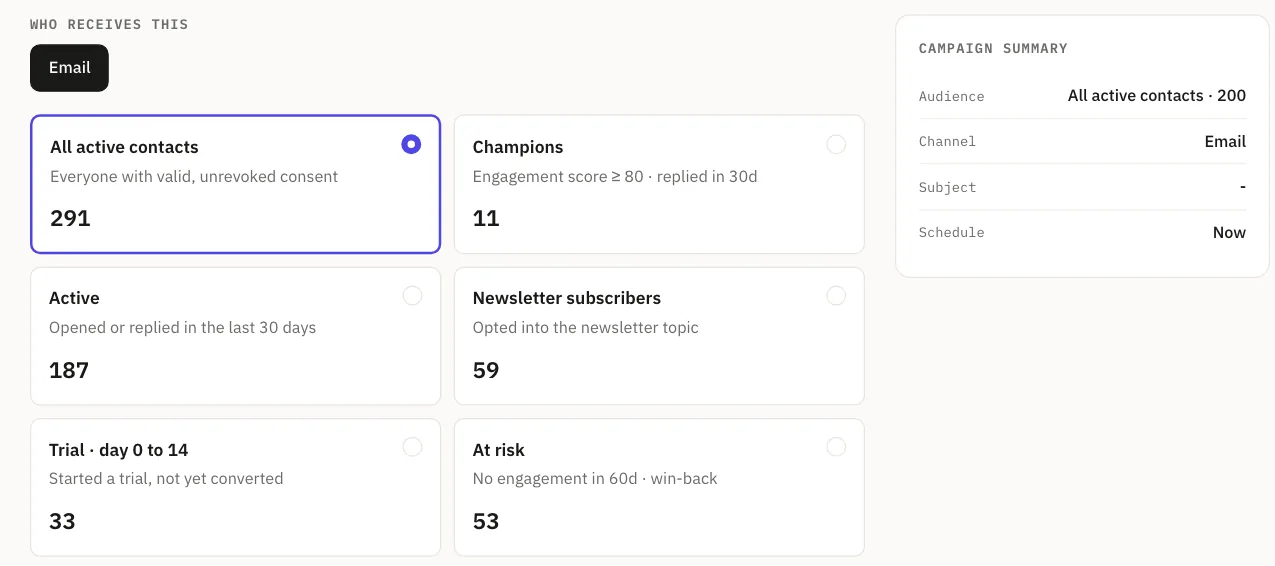
Send to the people the message is for. A new product announcement might go to everyone, while a message about an unfinished order goes only to the people with one. Leave out anyone you emailed very recently.
Step 6: Test, check, then send
- Send a test to yourself. Look at it on your phone and in your own inbox. Click every link. Email Digit sends tests from both the builder and the campaign Content step. See how to send a test email.
- Read the pre-send checks. They flag problems such as a missing postal address or a domain that is not fully set up. Warnings need you to acknowledge them before sending. See the pre-send checklist.
- Choose when to send. Now or later. If you are unsure, pick a normal working hour for your audience and keep notes on what you tried.
- Send.

Step 7: Read the results and change one thing
Look at replies first. A reply tells you what people thought in their own words, and Email Digit sorts replies by what they mean so you can find questions, interest and complaints quickly. Then look at clicks and purchases. Treat open rates with care, because some mail apps load images automatically and record an open nobody made.
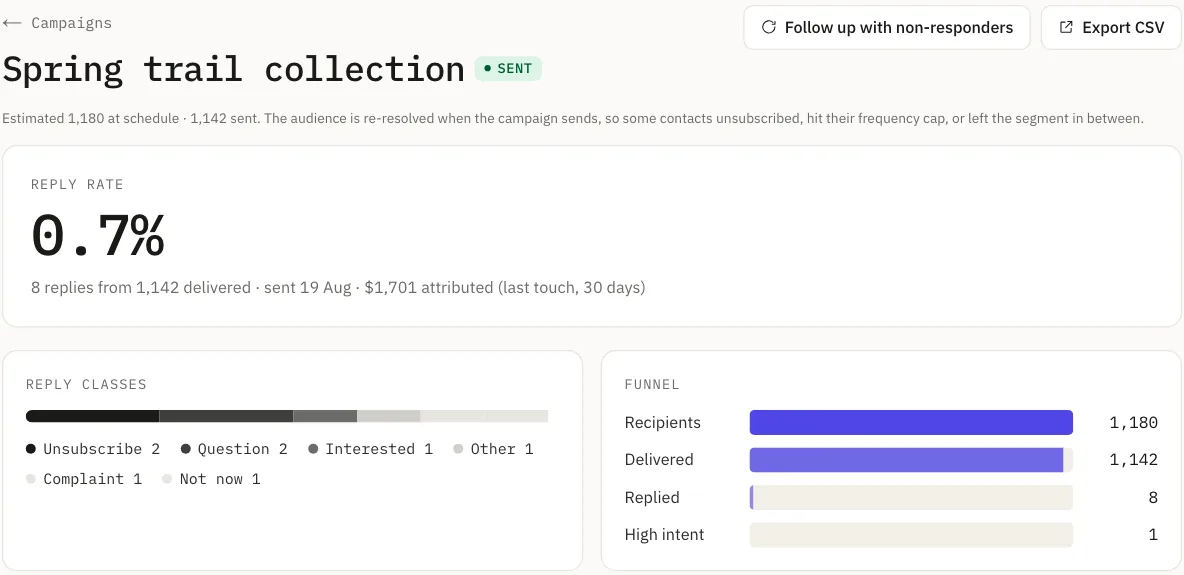
Compare the result with the goal you wrote down in step one. Then change one thing for the next send: the subject line, the audience, or the call to action. Changing three at once tells you nothing. To test subject lines properly, see A/B testing subject lines by replies.
A plan for your first month
| When | What to do |
|---|---|
| Week 1 | Write down your goal. Import contacts who agreed. Connect your sending domain and start the DNS records. |
| Week 2 | Set up your brand. Write a welcome email. Send a test to yourself and check it on a phone. |
| Week 3 | Send your first campaign to a small, engaged group. Read the replies and clicks. |
| Week 4 | Change one thing, such as the subject line, and send to a wider audience. Note what happened. |
This is a sensible pace, not a rule. If your domain is already connected and your list is ready, you can move faster.
A checklist you can copy
- I know the one goal of this email.
- Everyone on the list agreed to hear from me.
- My sending domain is connected and verified.
- The email has one purpose and one call to action.
- I sent a test and every link works.
- My postal address and unsubscribe link are in the email.
- I know what I will look at afterwards: replies, clicks, purchases.
Common mistakes to avoid
- Sending to people who never agreed to hear from you.
- Skipping the sending-domain setup, then wondering why mail goes to spam.
- Putting several calls to action in one email.
- Judging success by opens alone.
- Emailing the whole list more often than people want.
New to the terms? Start with what email marketing is and email marketing basics. Once you are sending, read email marketing best practices, and see how much email marketing costs when you choose a plan.
How do I start email marketing from scratch?
Choose one goal, collect addresses from people who agreed to hear from you, connect a sending domain, write one email with one purpose, test it, and send it to a clear audience.
Do I need a website to do email marketing?
Not strictly. You need a way for people to give you their address and a place to point the call to action, but that can be a form, a shop page or a booking page.
How often should I send marketing email?
As often as you have something worth reading, and no more. Watch replies and unsubscribes after each send, and slow down if unsubscribes rise.
Can I do email marketing without a large list?
Yes. A small list of people who want your mail is a good place to start, and replies from a small list are easier to read and act on.
What should I measure first?
Replies and clicks, then purchases or sign-ups that can be tied to the email. Opens are shown but are the least reliable of the four.