How to write an email that converts

An email that converts gives one reader one reason to act and one obvious way to do it. Write a subject line that says what is inside, open with why you are writing to this person, keep the message short and specific, and end with a single button or question. Then judge it by replies, clicks and purchases, not opens.
First, decide what "converts" means for this email
A conversion is the action you wanted: a reply, a booking, a purchase, a sign-up. Different emails have different goals, so decide before you write. A welcome email might aim for one click to a first step. A promotion aims for a purchase. A personal note might aim for a reply. If you cannot say the goal in one sentence, the email will not have one either.
The subject line
The subject line has one job: to get the right person to open the email by telling them what it is. It is not the place for tricks.
- Say what is inside. "Your order has shipped" beats "Great news inside!".
- Put the useful words first. Phones cut long subject lines off.
- Be specific. "Three ways to cut your shipping time" tells the reader more than "Shipping tips".
- Do not mislead. A subject line that promises something the email does not deliver costs you trust, and it is against the rules in many countries.
- Avoid shouting. Capital letters and many exclamation marks look like spam.
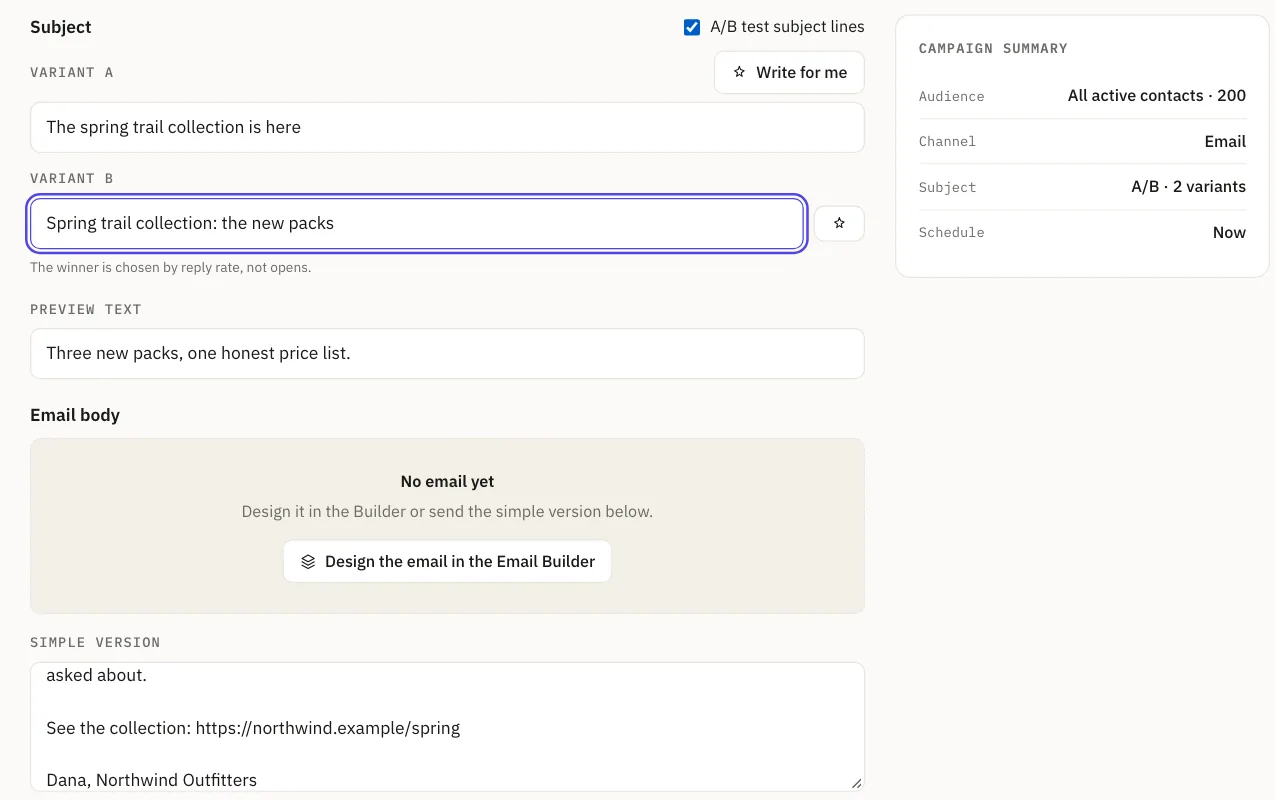
If you are stuck, Email Digit's "Write for me" suggests a subject line from your email. You can also test two versions. The winner is chosen by reply rate, not opens. See A/B testing subject lines by replies.
The opening line
After the subject line, the first sentence decides whether the reader continues. Tell them why you are writing to them specifically. "You bought the trail jacket in March, so I wanted to check the fit" is a reason. "We are excited to announce" is not.
The body
- Write to one person. Use "you". Picture a real reader and answer what they would ask.
- Lead with the benefit to them. What changes for the reader, in plain words, before the details of how.
- Keep it short enough for a phone. Short paragraphs, one idea each. Cut anything the reader does not need to act.
- Be concrete. A price, a date, a name or a number beats an adjective.
- Use real text. If the message is inside an image, it vanishes when images are blocked.
The call to action
One email, one thing to do. Make it a button or a clear link, and word it as the action: "Book a fitting", "See the new jackets", "Reply with your size". If you want replies, ask a direct question and say you will read every answer. Repeating the same button once near the end of a long email is fine. Offering three different actions is not.
Before and after
These examples are illustrations written for this guide. They show the pattern, not a tested result.
| Part | Weak | Stronger |
|---|---|---|
| Subject | Big news from us! | Trail jackets are back in stock, sizes S to XL |
| Opening | We are thrilled to share our latest update. | You asked when the green jacket would return. It is back today. |
| Button | Click here | See the green jacket |
Personalise with what you actually know
Using a first name is a start, but it is the smallest kind of personalisation. More useful is what the person did: a product they bought, a page they visited, a question they asked. Segments let you send a different version to each group. Only personalise with data the person gave you, and never imply you know something you do not.
Let AI draft it, then make it yours
If the blank page is the problem, describe the email in a sentence and Email Digit AI drafts the whole email in your brand's voice. Read it as a stranger would, fix anything that is not true, and cut anything vague. A draft is a starting point. See rewriting email copy in your brand voice.
Check it before you send
- Can a reader say what the email is for after two seconds?
- Is there one action, and is it obvious?
- Does it read well on a phone?
- Is every claim true, and every link right?
- Is there an unsubscribe link and your postal address?
- Have you sent a test to yourself?
The pre-send checklist covers the technical checks.
Measure conversion honestly
Opens are the least reliable number, because some mail apps load images without anyone reading. Look at replies, clicks and purchases, and see click rate in email marketing for how clicks are counted. If you send purchases back to Email Digit, it ties each one to the most recent email touch inside a 30 day window, so you can see which sends led to revenue. See counting each order once. For where to begin, read how to do email marketing and email marketing templates.
How do you write an email that gets a response?
Say who it is for and why you are writing, keep it short, ask one clear question or give one clear action, and make it easy to reply.
How long should a marketing email be?
As long as it needs to be for one action, and no longer. Read it on a phone: if you have to scroll a lot to reach the point, cut it.
What makes a good subject line?
One that says what is inside in plain words, puts the useful words first, and does not promise something the email does not deliver.
Should I use more than one call to action?
Keep to one main action. You can repeat the same button once in a long email, but competing actions split the reader's attention.
How do I know whether an email converted?
Check replies, clicks and purchases tied back to the send. Opens can be recorded without a read, so do not treat them as proof.