Email marketing template examples you can copy
Here are eight email marketing examples you can copy: a welcome email, a newsletter, an announcement, a promotion, a re-engagement email, a thank-you, a request for feedback and an event invitation. Each one shows a subject line, preview text, a short body and a single button. Replace the details with your own and keep the shape.
All eight use a made-up shop called Northwind Trail Co. They are illustrations written for this guide, not tested winners, so change them to sound like you.
How to read these examples
Each example follows the same pattern: a subject line that says what is inside, a preview line that adds one more fact, an opening that tells the reader why you are writing to them, one idea, and one button. For the layout of each type, see email marketing templates.
1. Welcome email
Subject: Welcome to Northwind Trail Co.
Preview: Here is what to expect, and one thing to try first.
Hi Maya, thanks for joining. We send one email a week about trail gear that lasts, and you can reply to any of them.
To start, tell us what you hike most. We will point you to the right kit.
[Button: Tell us how you hike]
Why it works: it sets expectations, gives one first step, and invites a reply.
2. Newsletter
Subject: Three ways to dry wet boots overnight
Preview: Plus a pack we tested and one we returned.
This week: a quick fix for wet boots, a pack review, and one question for you.
1. Boot drying. Stuff them with newspaper and keep them off the heater. [Read more]
2. Pack review. A 30 litre pack that carries well. [Read more]
3. Your turn. What is the first thing you pack? Reply and tell us.
Why it works: the subject names the most useful item, each section has one link, and the close asks for a reply.
3. Announcement
Subject: The green trail jacket is back in stock
Preview: Sizes S to XL, in the same fabric.
You asked when the green jacket would return. It is back today.
It is the same fabric and fit as before, with a longer hem. We have a small batch in each size.
[Button: See the green jacket]
Why it works: the news is in the subject, the opening says why this reader is getting it, and there is one button.
4. Promotion
Subject: Free shipping on orders this weekend
Preview: Ends Sunday at midnight.
Free shipping on every order until Sunday at midnight. No code needed.
It applies to anything in the shop, including the new jackets.
[Button: Shop this weekend]
Why it works: the offer and its end date are plain. Only state a deadline you will keep.
5. Re-engagement email
Subject: Still want to hear from us?
Preview: One click keeps you on the list.
We have not heard from you in a while, and we would rather email people who want it. If you would like to stay, click below. If not, no hard feelings.
[Button: Yes, keep me on the list]
Why it works: it is honest and easy to answer either way. Contacts who do not respond can be retired, which protects your reputation. See winning back or retiring quiet contacts.
6. Thank-you after a purchase
Subject: Thanks for your order, Maya
Preview: What happens next, and how to reach us.
Thank you for your order. We pack it within two working days and send you a tracking link.
If anything is wrong, reply to this email and a person will answer.
Why it works: it says what happens next and makes it easy to reply. A receipt that is triggered by an order is a transactional email, which has its own rules. See marketing versus transactional email.
7. Request for feedback
Subject: How is the jacket working out?
Preview: One question, and you can just reply.
You bought the trail jacket in March, so I wanted to check the fit. Is it doing what you hoped?
Just reply with a line or two. I read every answer.
Why it works: it is personal, asks one question, and the reply is the action.
8. Event invitation
Subject: Join us for a free fitting day on 14 December
Preview: Small groups, with time to try things on.
We are holding a fitting day at the shop on 14 December, from 10 in the morning to 4 in the afternoon.
Spaces are limited, so let us know if you plan to come.
[Button: Save my place]
Why it works: the date, place and action are all in plain sight.
Turn an example into your own template
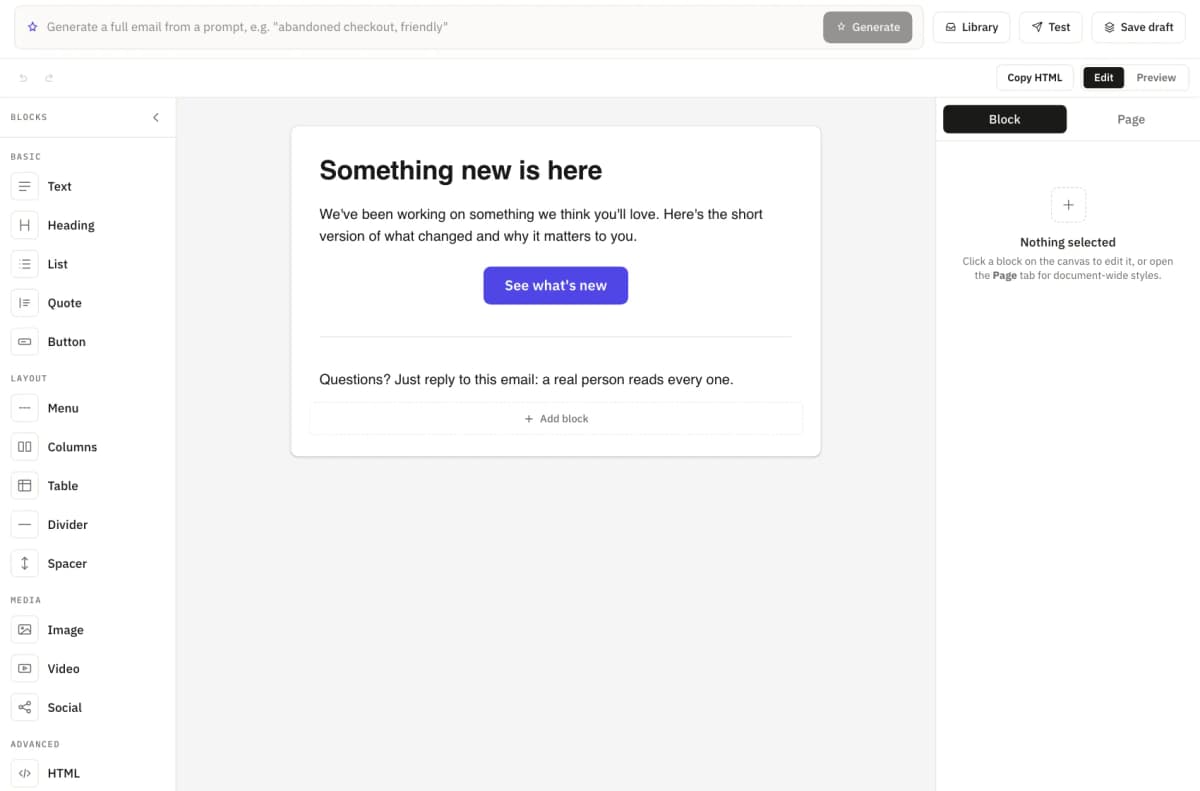
- Open the Message Builder and choose Library. Pick the starter closest to the example: Welcome, Newsletter, Announcement or Promotion. The other examples start from a Blank canvas with a few text blocks.
- Paste in your own words. Keep the structure and change the details.
- Or describe the email in a sentence and let Email Digit AI draft it in your brand's voice, then edit it. See rewriting email copy in your brand voice.
- Save it as a template from the campaign composer so the next send starts from it.
- Send a test to yourself and check it on a phone. See how to send a test email.
Common mistakes when copying an example
- Keeping the sample details. Replace every name, date and offer.
- Adding a second or third button. One email, one action.
- Copying a deadline you will not keep.
- Skipping the unsubscribe link and your postal address.
- Sending without a test.
For the writing itself, read how to write an email that converts, and for the habits behind it, email marketing best practices.
What are good examples of marketing emails?
A welcome email, a newsletter, an announcement, a promotion, a re-engagement email, a thank-you, a request for feedback and an event invitation. Each has one purpose and one action.
Can I copy these emails word for word?
Use them as a pattern, not a script. Replace the details with your own so the email sounds like you and says only what is true for your business.
Which example should I send first?
A welcome email. Every new contact receives it, so it is worth getting right before you plan anything else.
How long should an example email be?
Long enough for one action and no longer. These examples are only a few lines each. If you have to scroll a long way on a phone to reach the point, cut it.
Do these examples work as templates in Email Digit?
Yes. The Message Builder has starters for Welcome, Newsletter, Announcement and Promotion, and you can build the rest from a Blank canvas and save them as your own templates.